


TL;DR:
A larger line-item on a custom CRM proposal rarely speeds delivery. Hidden integration work, ongoing maintenance, and accrued technical debt silently eat budget and push timelines. By breaking the estimate into module-level buffers, tracking spend each sprint, and enforcing cost-gate reviews, you make every dollar visible and keep the launch on schedule.
Key Takeaways - Integration adapters and debt remediation can greatly increase the apparent cost of a “complete” CRM. - Spreadsheets miss dependency-driven risk; a cost-visibility framework captures it. - Micro-service isolation plus sprint-level buffers turns budget variance into a predictable range.
The Silent Killer: How Cost Estimates Hide Delays
Most CTOs assume that a bigger custom-CRM budget guarantees a faster launch, until the project stalls.
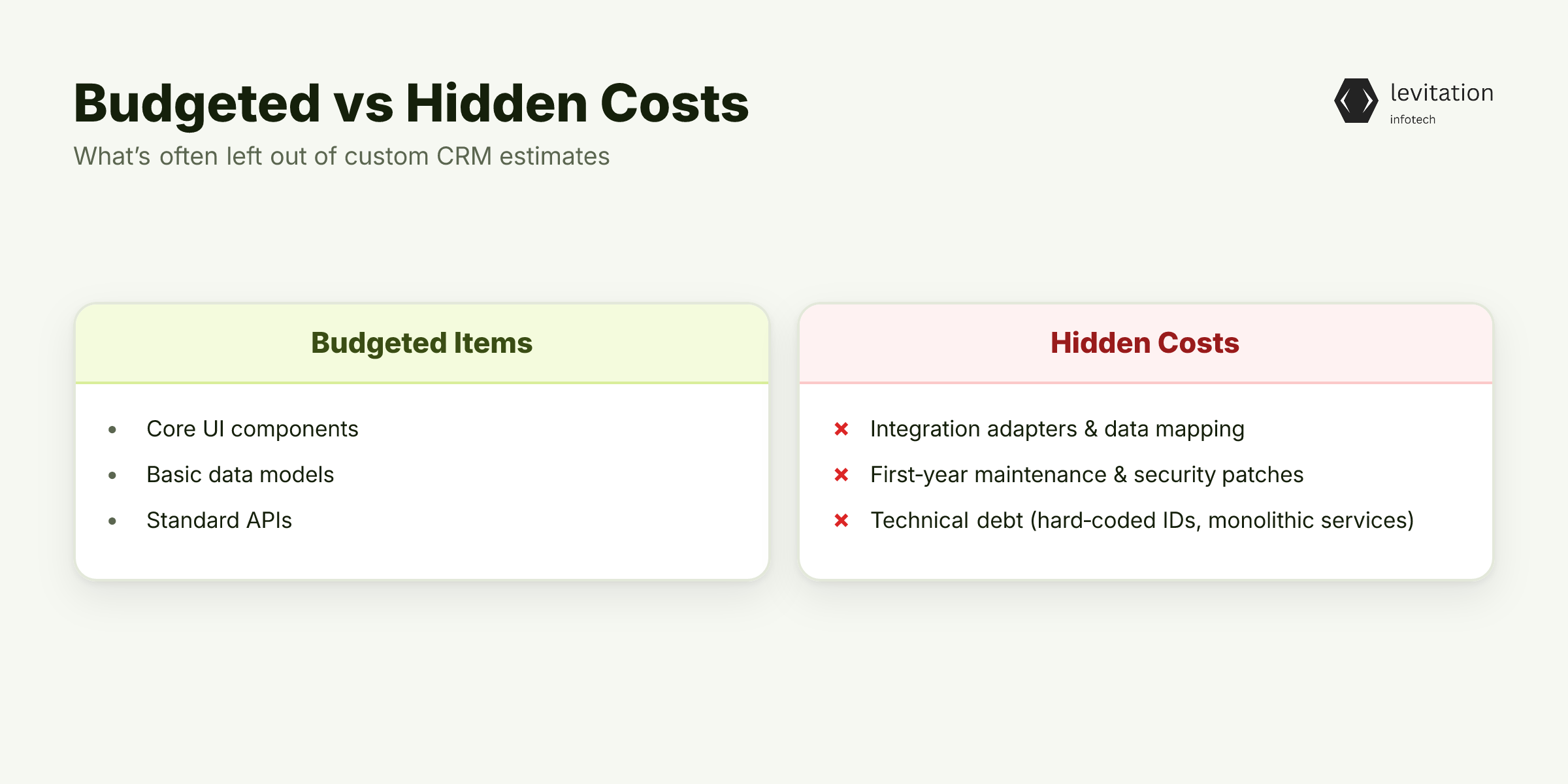
The first line of a proposal often reads “$150k for a complete system.” It covers core UI, basic data models, and a handful of APIs.
It excludes the work required to stitch the CRM into existing ERP, marketing automation, and AI recommendation engines. - Integration blind spots. Teams assume “plug-and-play” APIs, but legacy systems often need adapters, data mapping, and schema migrations. - Maintenance myth. The estimate rarely budgets for the first year of security patches, performance tuning, or version upgrades. - Technical debt omission. Early shortcuts - hard-coded IDs, monolithic services - look cheap now but become costly when scaling.
These hidden buckets turn a “big budget” into a ticking time bomb. Scope creeps, sprint velocity drops, and the roadmap slides. Throwing more money at the problem doesn’t magically align your roadmap.
What tools can expose these hidden costs before they explode?
Can you spot the hidden costs before they derail the project?
Why Simple Spreadsheets Can't Capture Real Costs
A spreadsheet can list line items, but it can’t model the inter-dependencies that drive CRM expenses.
Consider regional rate differences.
Developers in the United States command rates that are higher than offshore teams. This can greatly impact overall cost.
If a project shifts half the work offshore to control spend, the integration effort often rises. This is due to additional coordination and communication overhead.
Shifting work offshore often requires detailed API contracts and extra QA cycles. This can increase integration effort due to added coordination.
Complex integrations such as ERP, AI recommendation, or third-party payment gateways introduce extra effort. This includes schema translation, error handling, and monitoring.
These challenges often become apparent after the first integration sprint when bugs surface.
Ongoing maintenance is another silent drain. Security patches arrive quarterly; performance tuning is required as data volume grows. Without a line item for these activities, the budget overruns before the first release.
Spreadsheets also fail to represent risk propagation. When a downstream service slows, upstream teams wait, inflating labor costs across the board. A more robust approach is to treat the project as a graph of cost nodes linked by dependency edges.
By assigning a probability of delay to each edge, you can run a Monte Carlo simulation that surfaces the most volatile paths.
How does a cost-visibility framework turn these insights into action?
How can you model dependencies to prevent surprises?
Cost-Visibility Framework: Break Down, Track, Forecast
To tame hidden spend, decompose the CRM estimate into design, API/backend, frontend, integration, security, and AI modules. Treat each as a mini-project with its own budget, timeline, and risk buffer.
- Design - UI/UX, data model, user flows. Include a buffer for iterative user testing.
- API/Backend - Core services, database schema, authentication. Add a buffer for scaling tests.
- Frontend - React or Angular layer, component library. Use a buffer for cross-browser fixes.
- Integration - ERP, marketing, AI. Allocate a larger buffer because each external system introduces unknown edge cases.
- Security - OWASP hardening, role-based access, audit logging. Reserve a buffer for compliance patches.
- AI - Recommendation engine, predictive scoring. Set a buffer for model retraining and data-drift detection.
During each sprint, run a rolling cost review. Compare actual spend against the buffered estimate, flag overruns, and adjust the next sprint’s buffer.
This creates a feedback loop that surfaces hidden dollars before they explode.
Systems that survive five years in production often follow this disciplined tracking. Their codebases stay clean, and the organization can predict upgrade costs years ahead.
With every hidden dollar now visible, you can translate insight into concrete actions.
What steps turn this visibility into on-time delivery?
Action Plan: From Estimate to On-Time Delivery

1️⃣ Define an MVP scope that covers the core sales pipeline, contact management, and reporting dashboards. Anything beyond “must-have” lands in a later phase.
2️⃣ Choose a microservices architecture to isolate integration costs. Each external system lives in its own service, limiting blast radius when changes occur. (See our guide on [How to Architect Scalable Microservices on Kubernetes](/posts/architect-microservices-kubernetes) for deeper tactics.)
3️⃣ Allocate budget buffers per module and lock them with cost-gate milestones. A sprint cannot start unless the previous module’s buffer is either consumed or re-approved.
4️⃣ Set up CI/CD pipelines that enforce automated security testing and technical-debt detection. Static analysis flags hard-coded secrets; dependency scans highlight vulnerable libraries before they reach production. (Read more about our CI/CD Security Testing approach.)
5️⃣ Conduct monthly cost-gate reviews with the development partner. Bring the sprint burndown, buffer consumption, and any integration blockers to the table. Decision makers sign off only when variance stays within the agreed range.
6️⃣ Document technical debt items as tickets, then schedule dedicated remediation sprints after the MVP launch. Treat debt like any feature - estimate effort, assign owners, and track progress. (Our Technical Debt Management playbook outlines a four-step ticket lifecycle.)
7️⃣ Model dependency risk using a lightweight graph tool. Assign each integration node an expected delay factor based on past experience. Then run a quick simulation before each release cycle. This proactive view alerts you to “hot spots” that could blow the budget.
8️⃣ Create a transparent budget dashboard that aggregates module spend, buffer usage, and forecasted variance. Share it with both engineering leads and finance stakeholders every two weeks. Visibility turns speculation into data-driven decisions.
Once you have the dashboard set up, the next step is to run a pilot sprint and observe how buffers behave.
The Payoff: Faster Launches, Predictable Budgets, Enterprise Trust
When the framework is in place, time-to-market can be reduced to a few months typical of specialist vendors. A maintainable codebase that survives five years reduces total cost of ownership dramatically.
Key benefits materialize across the organization: - Stakeholder confidence rises because executives see a live budget burn-rate rather than a static spreadsheet. - Operational agility improves; new sales features can be added without re-architecting integration layers. - Compliance posture strengthens as automated security scans and audit logs are baked into every release. - Strategic planning becomes realistic; finance can allocate capital for future AI enhancements knowing the baseline cost.
Enterprise credibility follows naturally. The CRM aligns with the standards of large-scale AI deployments. This includes security certifications, performance SLAs, and clear upgrade paths.
Stakeholders gain confidence, and the organization can plan strategic initiatives on a solid foundation. This avoids firefighting budget crises.
What does the next sprint look like when you apply these principles?
Frequently Asked Questions
What hidden costs should I expect in a custom CRM project?
Beyond development, plan for integration adapters, ongoing security patches, performance tuning, and technical-debt remediation. Each can add a large amount to the original estimate.
How can I keep a custom CRM project on schedule?
Use a cost-visibility framework, break work into MVP-focused microservices, and enforce monthly cost-gate reviews tied to sprint deliverables.
Is it cheaper to build a CRM in-house than to outsource?
In-house teams often take much longer than a seasoned custom software partner. This leads to higher total cost despite lower hourly rates.
What regional factors affect custom CRM development cost?
US developer rates are higher than offshore rates, which can greatly impact overall cost.
How does technical debt impact CRM project timelines?
Unaddressed debt forces emergency fixes and slows new feature work. It can extend the project by months if not tracked and mitigated early.
Ready to bring cost clarity to your CRM project?
Sources
Research and references cited in this article:
- The Real Cost of Custom CRM Development in 2026 Full Analysis
- Custom CRM Development Cost in 2026: an In-Depth Guide
- Custom CRM Development Cost in 2026 - Purrweb
- How Much Does Custom CRM Development Cost in 2026?
- Custom CRM Development Cost in 2026 - Mediusware
- Software Development Hidden Costs Guide 2026
- Custom Software Development Costs 2026: Pricing & Hidden Fees
- Custom Software Development Cost: 2026 Pricing & Timeline ...
- Why CRM implementations fail: Common pitfalls and strategic ...
- CRM Implementation Failures 2026: Hidden Mistakes & Fixes
- Custom CRM Development: Common Challenges & Best Practices - Concise Studio
About the author
Mayank Singh is a software developer at Levitation Infotech, where he builds web and AI-powered applications across the company’s fintech, healthcare, and enterprise projects.