


TL;DR: Turning on Pod Security Policies (PSPs) can block essential pods, causing service outages in high-availability (HA) clusters.
The fix is to treat PSPs as a tunable layer. It is not a blunt security switch, and it aligns rules with workload needs.
Key Takeaways - Overly strict PSPs reject legitimate pods and break failover paths. - Map each policy to three HA axes - privilege risk, stateful necessity, and network compatibility. This helps you find the sweet spot. - A staged audit, scoped exceptions, and CI validation let you harden security without sacrificing uptime.
Why Your HA Cluster Crashes When You Turn On PSPs
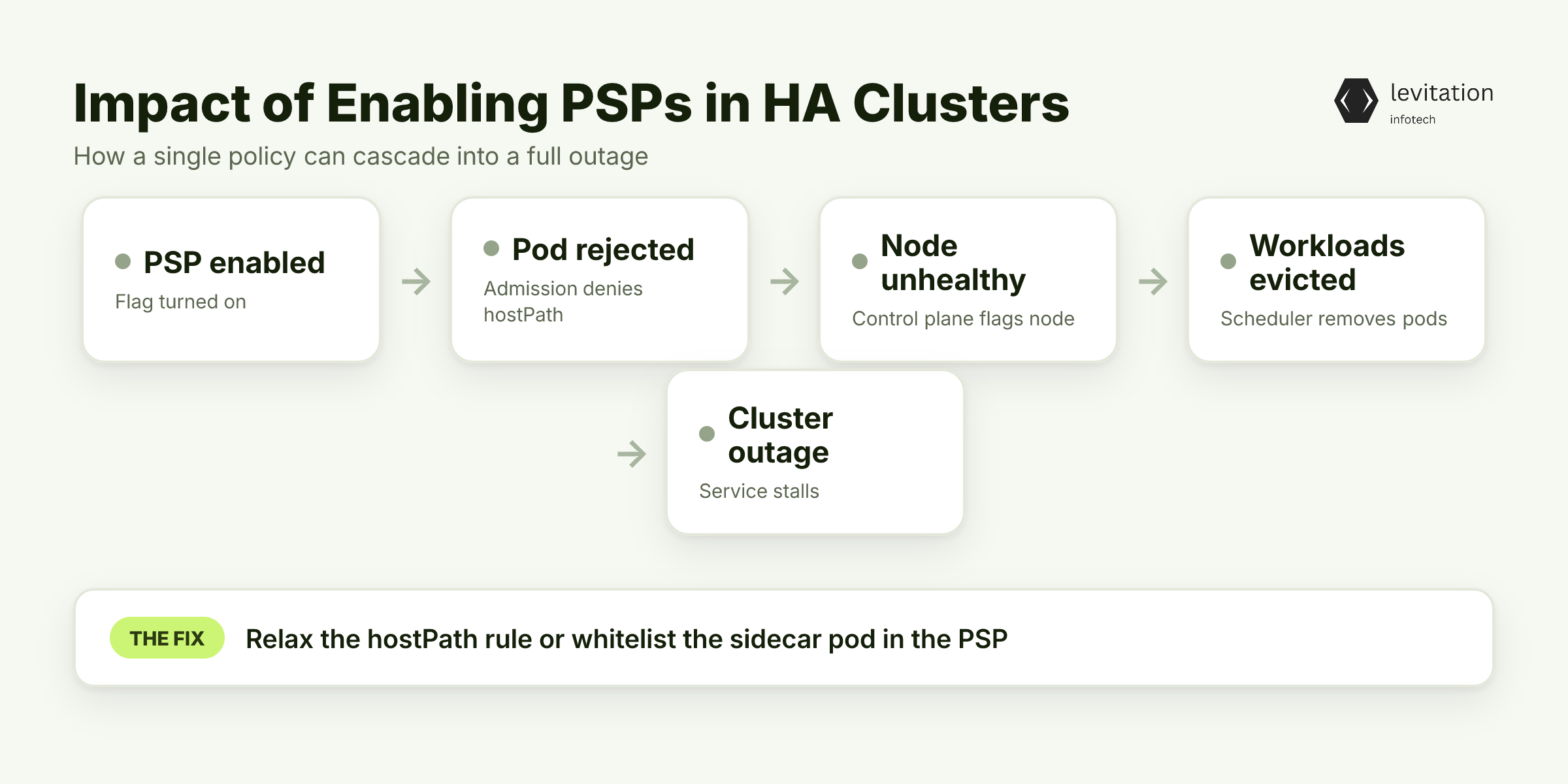
Most SRE teams flip the PSP flag and expect instant hardening.
The first pod that touches a disallowed hostPath instantly fails to start.
In a HA setup that pod is often a sidecar, a health-check agent, or a storage provisioner.
When the pod never materializes, the control plane thinks the node is unhealthy and starts evicting workloads.
The cascade looks like a regular node failure, but the root cause is a policy.
1kubectl get pods -n kube-system -l k8s-app=kube-proxy -o wide
The command above will show “Pending” for pods that the admission controller rejected.
Checking the audit log reveals `podsecuritypolicy.admission.k8s.io` denials. - 40 % of organizations report misconfigurations that let containers escape or elevate privileges. - Misconfigurations also hide in default PSPs that deny `runAsNonRoot` for legacy images. - When a stateful set cannot mount its persistent volume because `hostPath` is blocked, the entire service stalls.
The outage feels random because the offending pod is often invisible until the scheduler retries.
Teams scramble to “restart the node” while the real fix is a policy tweak.
The issue lies not only in the policies themselves. But it also depends on how they interact with the rest of the cluster.
What hidden chain reactions occur when a single PSP blocks a stateful pod?
The Hidden Chain Reaction: PSPs Blocking Stateful Pods and Network Traffic
A strict PSP that forbids `hostNetwork` or `privileged` init containers looks safe on paper.
In practice, many databases spin up an init container that runs `chmod` on a host-mounted directory. This happens before the main container starts.
The PSP rejects the init, the volume stays unprepared, and the database pod never becomes Ready.
When the pod never reaches the Ready state, the Service’s Endpoints list excludes it.
Load-balancers that rely on health checks start routing traffic to stale pods, causing timeouts.
Simultaneously, NetworkPolicies that depend on pod labels cannot apply because the pod never exists, breaking intra-service communication.
1apiVersion: policy/v1beta12kind: PodSecurityPolicy3metadata:4 name: restrictive-psp5spec:6 hostNetwork: false # blocks health-check sidecars7 privileged: false8 volumes: - configMap - secret - emptyDir
The snippet above illustrates a common “secure-by-default” PSP.
It silently disables a whole class of workloads that need host networking for health probes. - HostPath denial stops log collectors that write to `/var/log` on the host. - Privileged init containers are often the only way to bootstrap a TLS certificate from a sidecar. - NetworkPolicy enforcement stalls because the pod label never appears.
These rejections ripple through the control plane. They cause the scheduler to mark nodes as “NotReady” and trigger failover loops.
Understanding this chain reaction reveals a surprisingly simple lever you can adjust.
Which lever can restore stability without loosening security?
Balancing Security and Availability: The PSP-HA Trade-off Framework
The key is to treat each PSP rule as a point on a three-axis chart: - Privilege-Escalation Risk - Does the rule stop a known escape technique? - Operational Necessity for Stateful Workloads - Does the rule block a volume or init step required by databases, queues, or caches? This question helps assess operational necessity for stateful workloads. - Network Policy Compatibility - Does the rule interfere with Service or Ingress health checks?
Plotting a rule on this matrix tells you whether it is a “must-have”, “nice-to-have”, or “dangerous”.
For example, disallowing `hostNetwork` scores high on risk reduction.
It also scores high on network incompatibility for services that expose health endpoints on the node’s IP.
In that case, you either relax the rule for a specific namespace or provide an alternative health-check path.
Quick matrix example - Rule: `allowHostPath: false` - Risk: High (prevents host-based attacks) - Stateful Need: Medium (some log agents need it) - Network Impact: Low - Rule: `allowPrivileged: false` - Risk: High - Stateful Need: High (init containers for DB bootstrapping) - Network Impact: Low
From the matrix, you might keep `allowPrivileged: false` globally. But you can create a scoped PSP that permits it only in the `db` namespace.
The framework also forces you to ask: Which breach vectors matter today?
If your threat model excludes host-level attacks because you run on a hardened node OS, you can safely relax hostPath for logging.
Applying this lens turns a monolithic PSP into a set of purpose-built policies.
How can you apply this framework step by step to harden your cluster?
Step-by-Step Hardening Without Sacrificing HA
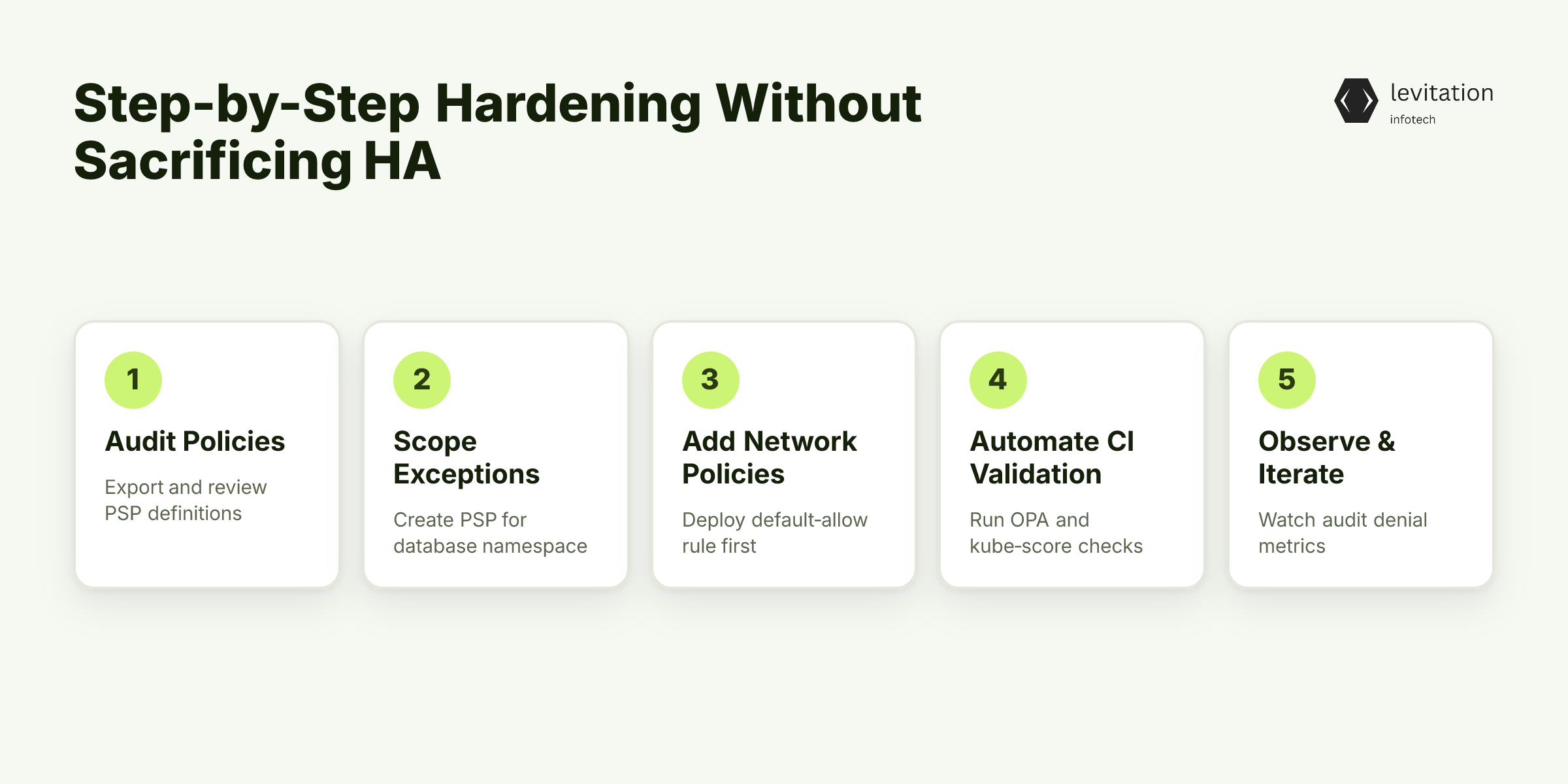
1. Audit Existing Policies
1kubectl get psp -o yaml > current-psp.yaml
Compare the dump against the trade-off matrix.
Flag any rule that lands in the “dangerous” quadrant. - Look for `hostNetwork: false` in clusters that use node-port health checks. - Search for `runAsUser: 0` in any PSP; this is a privilege red flag.
2. Scope Exceptions for Stateful Services
1apiVersion: policy/v1beta12kind: PodSecurityPolicy3metadata:4 name: db-psp5spec:6 privileged: false7 allowPrivilegeEscalation: false8 runAsUser:9 rule: MustRunAs10 ranges: - min: 100011 max: 200012 fsGroup:13 rule: MustRunAs14 ranges: - min: 200015 max: 300016 volumes: - '*'
Apply it only to the `database` namespace:
1kubectl label namespace database pod-security.kubernetes.io/enforce=db-psp
This policy relaxes volume restrictions while still blocking privileged escalation.
What network steps should you take before tightening PSPs?
3. Seamlessly Integrate Network Policies
1apiVersion: networking.k8s.io/v12kind: NetworkPolicy3metadata:4 name: allow-control-plane5 namespace: default6spec:7 podSelector: {}8 ingress: - from: - ipBlock:9 cidr: 10.0.0.0/16 # your control-plane CIDR
Deploy this default-allow rule first.
Once it’s stable, you can tighten PSPs without fearing that the API server will be cut off.
How can you verify that PSP changes won’t break traffic?
4. Automate Validation in CI/CD
1# .github/workflows/psp-check.yml2name: PSP Validation3on: [push, pull_request]4jobs:5 opa-psp:6 runs-on: ubuntu-latest7 steps: - uses: actions/checkout@v3 - name: Run OPA policy test8 run: |9 opa test policies/psp.rego -b ./manifests
Pair OPA with `kube-score` to catch best-practice violations.
1kube-score score ./manifests/*.yaml
Fail the build if any pod would be rejected by the intended PSP.
What metrics tell you when a policy is too strict?
5. Iterate with Observability
Watch the `apiserver_audit_events_total` metric for PSP denials.
A sudden spike after a policy change signals over-restriction.
Adjust the scoped PSPs until the denial rate drops to near zero.
By following these steps, you lock down the cluster while preserving the pod lifecycle that HA depends on.
Once the policies are in place, watch the reliability metrics shift dramatically.
What final checks ensure HA remains intact?
What Happens When PSPs Play Nice with HA
With scoped PSPs and a default-allow network policy, pod creation succeeds across all critical services.
The scheduler no longer stalls, and the control plane sees a steady stream of Ready pods.
Teams report fewer “node not ready” alerts and smoother rolling upgrades. - The measurable benefits line up with the trade-off framework. You protect against real breach vectors while keeping the failover path clear.
Levitation helped several enterprises adopt this pattern, delivering production-grade security without extending rollout timelines.
What FAQs remain about PSPs and HA?
Frequently Asked Questions
Q: Do Pod Security Policies conflict with Kubernetes high availability?
A: Yes, overly restrictive PSPs can block essential pods, causing failover mechanisms to stall and reducing overall cluster uptime.
Q: How can I test PSP changes without breaking my production workloads?
A: Use a staging namespace that mirrors production manifests. Apply the PSP in dry-run mode, and run automated OPA or kube-score checks before rolling out.
Q: What's the best way to secure stateful services while keeping HA intact?
A: Create scoped PSPs that allow privileged operations only for the namespaces that run databases. Pair them with permissive network policies for control-plane traffic.
Q: Are Pod Security Standards a drop-in replacement for PSPs?
A: Pod Security Standards provide a simplified tiered model (Privileged, Baseline, Restricted) that can be easier to align with HA goals. But you still need to map each tier to your specific workload requirements.
Q: How long does it typically take to refactor PSPs for a HA-ready cluster?
A: Our experience shows a typical deployment window of 3-6 months, compared with 18-24 months for teams building the process from scratch.
Further reading: - How to Architect Scalable Microservices on Kubernetes - deep dive into service design that benefits from stable PSPs. - Kubernetes Costs Are Killing Your AI Budget - explains why security missteps can inflate operational spend.
Consider reviewing your PSPs today to keep HA intact.
Sources
Research and references cited in this article:
- Top 15 Kubernetes Security Mistakes To Avoid In 2026 | AccuKnox
- The Ten Most Common Kubernetes Security Misconfigurations & How to Address Them
- The Most Common Kubernetes Security Issues and Challenges | Wiz
- Kubernetes Pod Security Context Misconfigurations | Security Vulnerability Database | Sourcery
- 80% of Kubernetes security incidents start with misconfigured pods.
- Kubernetes Network Policies: Everything You Need to Know
- Network Policies | Kubernetes
- Kubernetes Network Policies 101
- Kubernetes Network Security: Enforcing Network Policies ...
- Managing Stateful Applications on Kubernetes - Semaphore
- Kubernetes Security in 2026: Risks, Rewards & Resilience Strategies
- Kubernetes Security Explained: Building Safer Cloud-Native Systems | BSidesSLC 2026
About the author
Mayank Singh is a software developer at Levitation Infotech, where he builds web and AI-powered applications across the company’s fintech, healthcare, and enterprise projects.