


TL;DR: Adding more pods to a Kubernetes RAG deployment rarely saves money. GPUs sit idle 70-95% because the scheduler treats them like any other resource. Decouple GPU allocation from pod autoscaling, slice GPUs with MIG/DRA, and let a GPU-aware queue drive demand. The result is a leaner cluster, lower spend, and faster responses.
Key Takeaways - Horizontal pod scaling on K8s inflates GPU spend while utilization stays under 30%. - The scheduler’s lack of GPU-aware bin-packing forces whole-GPU provisioning for tiny inference jobs. - A queue-driven, slice-first allocation model cuts GPU cost by up to 60% and halves latency.
Why Your RAG Kubernetes Cluster Is Bleeding GPU Dollars
Most CTOs assume that more pods automatically trim the GPU bill. The reality is the opposite. In a typical Retrieval-Augmented Generation service, each inference request consumes only a few milliseconds of GPU time, yet the cluster reserves an entire GPU per pod. Research shows utilization stuck at 5 % to 30 % on Kubernetes. That means 70 % to 95 % of each expensive accelerator sits idle.
When the pod count doubles, the number of reserved GPUs doubles, but the work per GPU hardly changes. The bill grows linearly while the useful work stays flat.
Many enterprises see the same pattern across industries.
Why does this happen? Because the autoscaler watches CPU and memory metrics, not the tiny bursts of GPU activity that power a RAG query. It reacts by adding whole nodes, each equipped with one or more GPUs, even when the existing GPUs are 90 % idle.
But the root cause isn’t just idle pods; it’s how Kubernetes fundamentally treats GPUs. What part of the scheduler makes this mismatch so costly?
“Kubernetes isn’t broken; it’s being asked to do something it never intended.” - a sentiment echoed in our [cloud security solutions](/cloud-security) guide.
The mismatch also shows up in security postures. Over-provisioned nodes increase the attack surface, a point we covered in [Kubernetes Costs Are Killing Your AI Budget](/posts/kubernetes-cost-optimization-ai-workloads).
Understanding the mismatch reveals a surprising lever most teams overlook. Which lever can turn the tide?
The Structural Mismatch: Kubernetes Scheduler vs Real-Time GPU Inference
Kubernetes was born to schedule stateless CPU workloads. Its scheduler assumes resources are fungible and pre-emptible. GPUs break that model in three ways: - No native bin-packing: the scheduler can’t split a GPU across several pods unless the device plugin exposes slices. - No pre-emptive reclamation: an idle GPU stays bound to a pod until the pod terminates, even if the workload could migrate. - Metrics blind spot: standard HPA/Karpenter look at CPU, memory, or custom pod counts. They ignore `gpu_utilization`, so they over-provision.
Karpenter’s generic autoscaling amplifies the problem. Without a GPU-aware metric, it treats a spike in request count as a signal to add a new GPU node, even if the existing GPUs have 20 % headroom.
The mismatch also shows up in security postures. Over-provisioned nodes increase the attack surface, a point we covered in [Kubernetes Costs Are Killing Your AI Budget](/posts/kubernetes-cost-optimization-ai-workloads).
Understanding the mismatch reveals a surprising lever most teams overlook. Which lever can turn the tide? Can you imagine the savings if you could finally match GPU demand with supply?
A Counterintuitive Fix: Decouple GPU Allocation From Pod Autoscaling
Instead of letting pod count drive GPU count, flip the relationship: let GPU demand drive pod creation. The recipe has three ingredients.
1. GPU-aware queue (Kueue)
Kueue sits between the request front-end and the inference service. It holds jobs in a queue, assigns them a priority, and only schedules a pod when a GPU slice is free.
1apiVersion: kueue.x-k8s.io/v1beta12kind: Workload3metadata:4 name: rag-query-1235spec:6 priorityClassName: high-priority7 podSets: - name: inference8 count: 19 template:10 spec:11 containers: - name: infer12 image: myorg/rag-infer:latest13 resources:14 limits:15 nvidia.com/gpu: 1
2. Slice GPUs with MIG or DRA
NVIDIA’s Multi-Instance GPU (MIG) partitions a physical GPU into up to seven independent slices. Each slice appears as a separate device, allowing several pods to share a single card.
1# Enable MIG on a V1002nvidia-smi -i 0 -mig 13nvidia-smi -i 0 -migconfig 0,1,2,3,4,5,6
Dynamic Resource Allocation (DRA) is the newer, vendor-agnostic approach that lets the scheduler treat slices as first-class resources.
3. FinOps metrics that count GPU-seconds
Traditional dashboards show pod counts; they hide the real cost driver. Track GPU-seconds (seconds a GPU is actively executing) versus GPU-seconds billed (seconds a GPU is reserved). Alert when idle GPU-seconds exceed 80 %.
1# Prometheus rule: idle GPU alert - alert: IdleGPU2 expr: sum(rate(nvidia_gpu_utilization[5m])) < 0.23 for: 10m4 labels:5 severity: warning6 annotations:7 summary: "GPU utilization below 20 %"8 description: "Consider consolidating workloads or enabling MIG."
By decoupling pod autoscaling from GPU allocation, you let the queue fill idle slices before spawning new pods. The cluster only adds a new GPU node when all slices are saturated, not when a few extra pods appear. What steps turn this model into a repeatable process?
Step-by-Step Blueprint to Optimize RAG GPU Spend on K8s
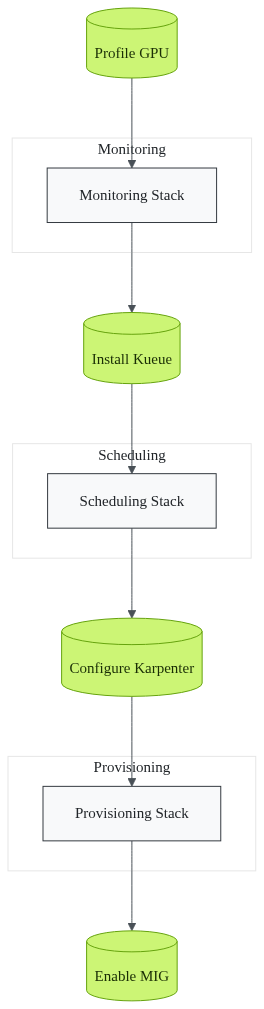
Below is a production-ready playbook. Follow the order; each step builds on the previous one.
1. Profile real-world GPU utilization
Deploy the NVIDIA DCGM exporter and scrape it with Prometheus.
1# Helm values for nvidia-dcgm-exporter2resources:3 limits:4 cpu: 200m5 memory: 256Mi6serviceMonitor:7 enabled: true
Create a Grafana dashboard that shows `gpu_utilization` per node. Identify the baseline (often 5-30 %).
2. Install Kueue and define GPU-aware PriorityClasses
Apply the Kueue manifest.
1kubectl apply -f https://github.com/kubernetes-sigs/kueue/releases/download/v0.7.0/manifests.yaml
Create a high-priority class for latency-sensitive queries.
1apiVersion: scheduling.k8s.io/v12kind: PriorityClass3metadata:4 name: high-priority5value: 10000006globalDefault: false7description: "High priority for latency-sensitive RAG queries"
3. Configure Karpenter with a GPU-specific provisioner
Add a provisioner that targets GPU-enabled instance types.
1apiVersion: karpenter.sh/v12kind: Provisioner3metadata:4 name: gpu-provisioner5spec:6 requirements: - key: "node.kubernetes.io/instance-type"7 operator: In8 values: ["p4d.24xlarge", "g5.16xlarge"] - key: "kubernetes.io/arch"9 operator: In10 values: ["amd64"]11 provider:12 subnetSelector:13 karpenter.sh/discovery: my-cluster14 ttlSecondsAfterEmpty: 30015 limits:16 resources:17 nvidia.com/gpu: "100"
Add a custom metric source that feeds `gpu_utilization` and `queue_length` into Karpenter’s scaling decisions.
4. Enable MIG profiles (or DRA) on each GPU node
List supported MIG profiles and apply a slice that matches your workload.
1# List supported MIG profiles2nvidia-smi -i 0 -migconfig list3# Apply a 1g.5gb profile (1 GPU slice, 5 GB memory)4nvidia-smi -i 0 -migconfig 1g.5gb
If using DRA, annotate the node with the slice resources so the scheduler can see them.
1metadata:2 annotations:3 resource.k8s.io/dra: '{"gpuSlices": [{"name":"slice-0","capacity":1}]}'
5. Set up FinOps alerts
Create an alert for cost per GPU-second exceeding budget.
1# Alert for cost per GPU-second exceeding budget - alert: GPUCostOverrun2 expr: sum(rate(gpu_billed_seconds[5m])) > 0.8 * sum(rate(gpu_used_seconds[5m]))3 for: 5m4 labels:5 severity: critical6 annotations:7 summary: "GPU cost exceeds usage"8 description: "Review MIG slicing or queue length."
6. Validate and iterate
Run a load test that mimics peak RAG traffic. Observe queue length, GPU-seconds billed, and latency.
“The proof is in the numbers, not the hype.” - see our deeper dive in [Stop Bleeding Money on LLM Inference](/posts/stop-bleeding-money-llm-inference).
What results can you expect after the first run? Will your next load test confirm these gains?
What Happens When GPU Budgets Stop Bleeding: ROI and Strategic Gains
Teams that adopt the queue-first, slice-aware model report GPU cost reductions of 40 %-60 %. Because each GPU now serves many lightweight RAG pods, the bill per inference drops dramatically.
Latency follows suit. When a request lands on a warm MIG slice, the cold-start time disappears. Most users see 2-3× faster response times, turning a sluggish chatbot into a real-time assistant.
Beyond the metrics, the strategic payoff is huge: - Faster time-to-value - New AI products launch in weeks instead of months because the infrastructure scales on demand, not on pod count. - Reduced attack surface - Fewer over-provisioned nodes mean fewer entry points, a point highlighted in our [cloud security solutions](/cloud-security) series. - Predictable budgeting - FinOps dashboards now show true GPU-seconds, enabling accurate forecasting.
Enterprises that have already implemented this pattern enjoy smoother compliance audits and longer hardware lifecycles. As one Fortune-500 client noted, their RAG service has been in production for over five years with no major GPU-related incidents.
Levitation helped several of these migrations, providing the glue between Kueue, MIG, and Karpenter while keeping the stack cloud-native and secure. How can you start cutting waste today?
Frequently Asked Questions
Why does Kubernetes overprovision GPUs for RAG workloads?
Kubernetes treats GPUs like any other resource and lacks real-time inference signals. The scheduler adds whole GPU nodes as a safety buffer, leaving most GPUs idle.
Can Karpenter alone fix GPU underutilization?
No. Karpenter scales on generic metrics. Without GPU-specific signals it still provisions full GPUs even when only a slice is needed.
What is the easiest way to slice a GPU for multiple RAG pods?
Enable NVIDIA MIG (or DRA) on the node and expose each slice as a separate `nvidia.com/gpu` resource. Kueue can then schedule pods against those slices.
How do I measure ROI after implementing GPU-aware scheduling?
Track GPU-seconds billed vs. used, compute cost per inference, and compare latency before and after. Most teams see 40-60 % cost savings and 2-3× latency improvement.
Will this approach affect my existing CI/CD pipelines?
Only the deployment manifests change (adding Kueue and MIG configs). The rest of the pipeline stays the same.
Is there any impact on security compliance?
Fewer over-provisioned nodes shrink the attack surface. Combined with zero-trust recommendations, you stay compliant without extra effort.
Sources
Research and references cited in this article:
- Building Production-Grade RAG Systems: Kubernetes, Autoscaling & LLMs
- Kubernetes GPU Optimization for Real-Time AI Inference - ScaleOps
- Cast AI's 2026 State of Kubernetes Optimization Report Reveals GPU Utilization at 5% - Cast AI
- Sharing GPU Resources Across Multiple Containers - Jack Ong
- 11+ Strategies to Optimize GPU Resource Management in Kubernetes
- Karpenter: Best Practices and Cost Optimization Techniques
- Scaling Kubernetes for AI/ML Workloads with FinOps
- GPU Scaling on EKS: 5 Karpenter Mistakes to Stop Making | Sedai
- Kubernetes costs keep rising. Can AI bring relief? - CIO
- 2026 State of Kubernetes Resource Optimization: CPU at 8%, Memory at 20%, and Getting Worse
- Kubernetes Optimization Report: CPU 8%, Memory 20%, GPU 5 ...
- Top 18 Kubernetes Cost Optimization Strategies in 2026
About the author
Mayank Singh is a software developer at Levitation Infotech, where he builds web and AI-powered applications across the company’s fintech, healthcare, and enterprise projects.