


TL;DR: Passing a WCAG 2.2 audit does not mean your site works for people. It does not mean assistive technology users can use it. Automated scanners miss issues that need human judgment. Overlay widgets make things worse. Courts check if a person with a disability can actually use the product. The fix uses expert manual audits, real screen reader testing, and accessibility in delivery.
Key Takeaways: - Automated tools miss WCAG 2.2 issues that need human review. These include focus management, reading order, and custom ARIA patterns. - The FTC has fined overlay vendors for fake compliance claims. The tech itself often breaks screen readers. - Courts look at usability, not checkboxes. The test is whether a real user with a disability can finish a core task. - Continuous accessibility engineering costs less than annual audits. CI checks, component libraries, and release-cycle screen reader testing are part of it.
The Audit Paradox: When "Compliant" Means Unusable
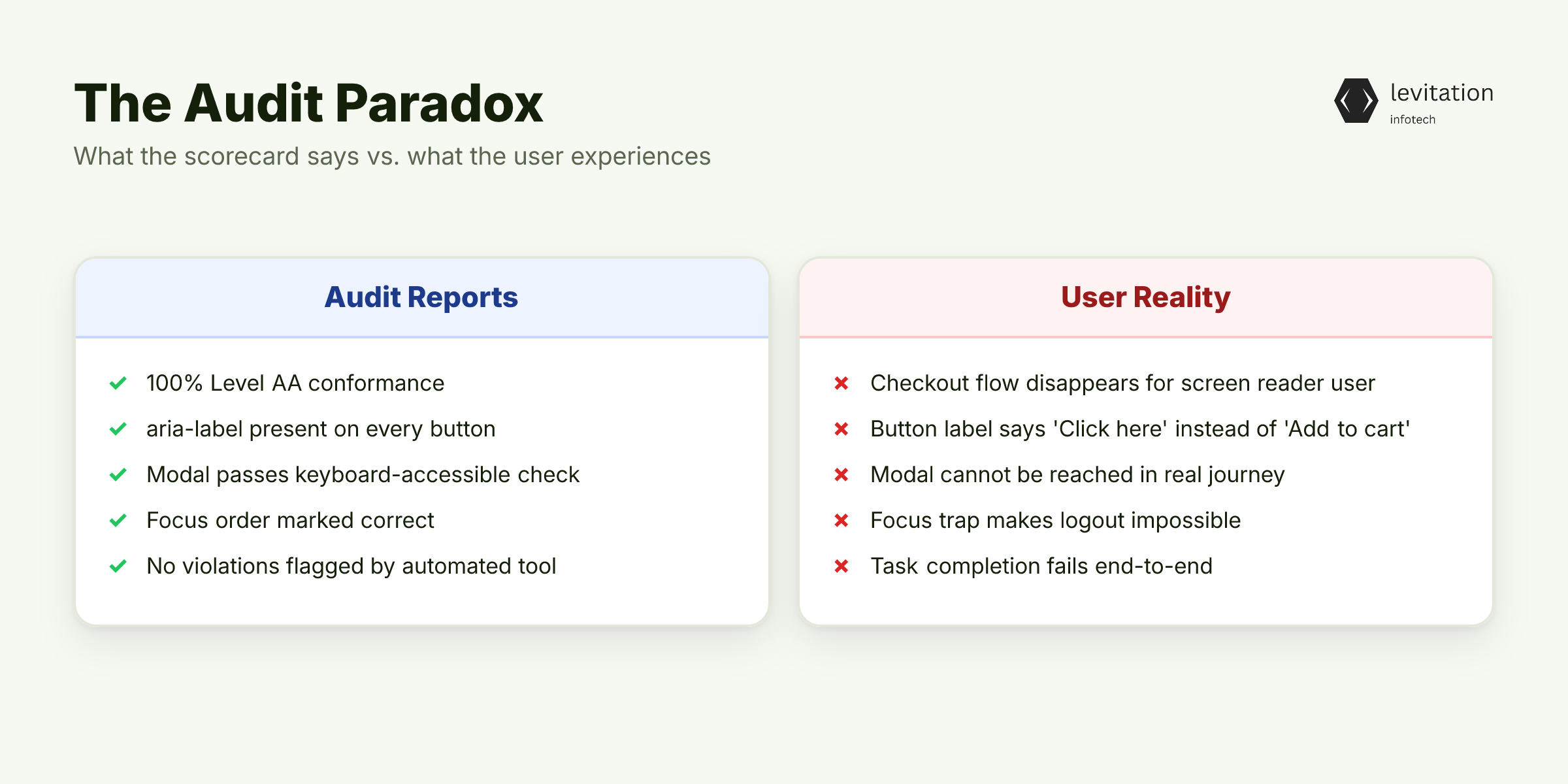
Your team just passed a WCAG 2.2 audit. A blind user opens JAWS, hits your homepage, and your checkout flow disappears. The green checkmark on the compliance dashboard means nothing. It means nothing if real users can't finish a single task. This is the audit gap no one talks about until it is too late.
WCAG 2.2 is a dense spec. It has success criteria across perception, operability, understandability, and robustness. A scorecard from an accessibility audit shows which criteria pass and which fail. That is useful. But it is not the same as proving a blind user can finish a purchase.
The gap is between conformance and usability. A site can meet Level AA on every checkbox. Yet it can still trap a screen reader user in an unlabeled form field, an unreachable modal, or a focus trap that makes logout impossible. The audit reports a binary result. The user's experience is a spectrum.
Most accessibility failures are invisible to a checklist. A button passes the "non-text content" rule because it carries an aria-label. But the label says "Click here" instead of "Add to cart." The user has no idea what the button does. Conformance passes. Task completion fails.
The risk is not theoretical. Demand letters reference specific user journeys. A passed audit is treated as evidence of negligence when those journeys break.
If automated tools give you a passing grade, what are they missing?
What Automated Scanners Actually Detect (Spoiler: Less Than You Think)
Industry testing shows automated tools miss issues only human review can catch. The gap widens on criteria that need experiential judgment. Accessibility problems depend on user interaction. So they slip past your scanner. They need observing how a real user moves through the page, not just parsing the DOM.
The pattern is consistent across every major tool. Scanners reliably flag missing alt text, low contrast, and empty links. These are pattern-matchable against the DOM. Scanners reliably miss logical reading order. They miss accessible name calculation failures in custom components. They miss focus management in single-page apps. They also miss whether error messages are tied to the correct input.
Consider Focus Not Obscured (Minimum), one of the new criteria in 2.2. It requires that a focused element is not hidden behind sticky headers, cookie banners, or chat widgets. A scanner cannot tell if a sticky element is overlapping your form fields. It can only see the static markup.
Dragging Movements is another 2.2 addition. The criterion requires a single-pointer alternative for any drag operation. Scanners cannot tell if your drag-and-drop kanban board has a keyboard alternative. They see the draggable attribute. They do not see the experience.
Target Size (Minimum) requires interactive elements to meet a minimum hit area in CSS pixels. A scanner measures the element. It does not measure the touch zone after a CSS transform. It does not measure the effective hit area when the element is inside a transformed parent.
These are the criteria the scanner cannot evaluate. A WCAG audit that relies on automated tools will miss them. The user who tries to finish a task on a phone will hit them first.
So teams buy the next obvious fix. They buy an overlay widget that promises to handle accessibility automatically. That move has cost vendors a million dollars in FTC penalties. Here is why.
The Overlay Widget Illusion: Why On-Click Compliance Doesn't Exist
The FTC issued a $1M settlement against an accessibility overlay vendor. The reason was fake compliance claims. At least one major vendor has faced class-action suits from its own customers. The suits came not from disabled users, but from enterprise buyers who paid for a product that did not work.
The technical reality explains why. Overlay widgets inject their own DOM. They rewrite ARIA attributes on the fly. They often interfere with native screen reader behavior rather than enhance it. The overlay sits between your code and the assistive technology. It makes decisions about your interface that you did not authorize.
The fundamental problem runs deeper. Overlay tools can only address surface-level markup issues. They cannot fix a button that triggers a JavaScript function with no accessible name. The fix needs changing component code the overlay does not own. They cannot fix a focus trap because focus is managed by your router, not by their injected script.
Worse, when the overlay rewrites ARIA at runtime, it can mask the original failure. Your audit tool may report a clean pass. The overlay is patching the symptom in the DOM. The moment the user disables the overlay, the underlying failure returns. The same happens if they use a screen reader version the overlay does not support.
A WCAG compliance program built on an overlay is a house with fresh paint and no foundation. Courts see through it. So do users.
So if automation fails and overlays fail, what question is a court actually asking when an ADA demand letter lands?
What Courts Actually Evaluate: Usability, Not Checkboxes
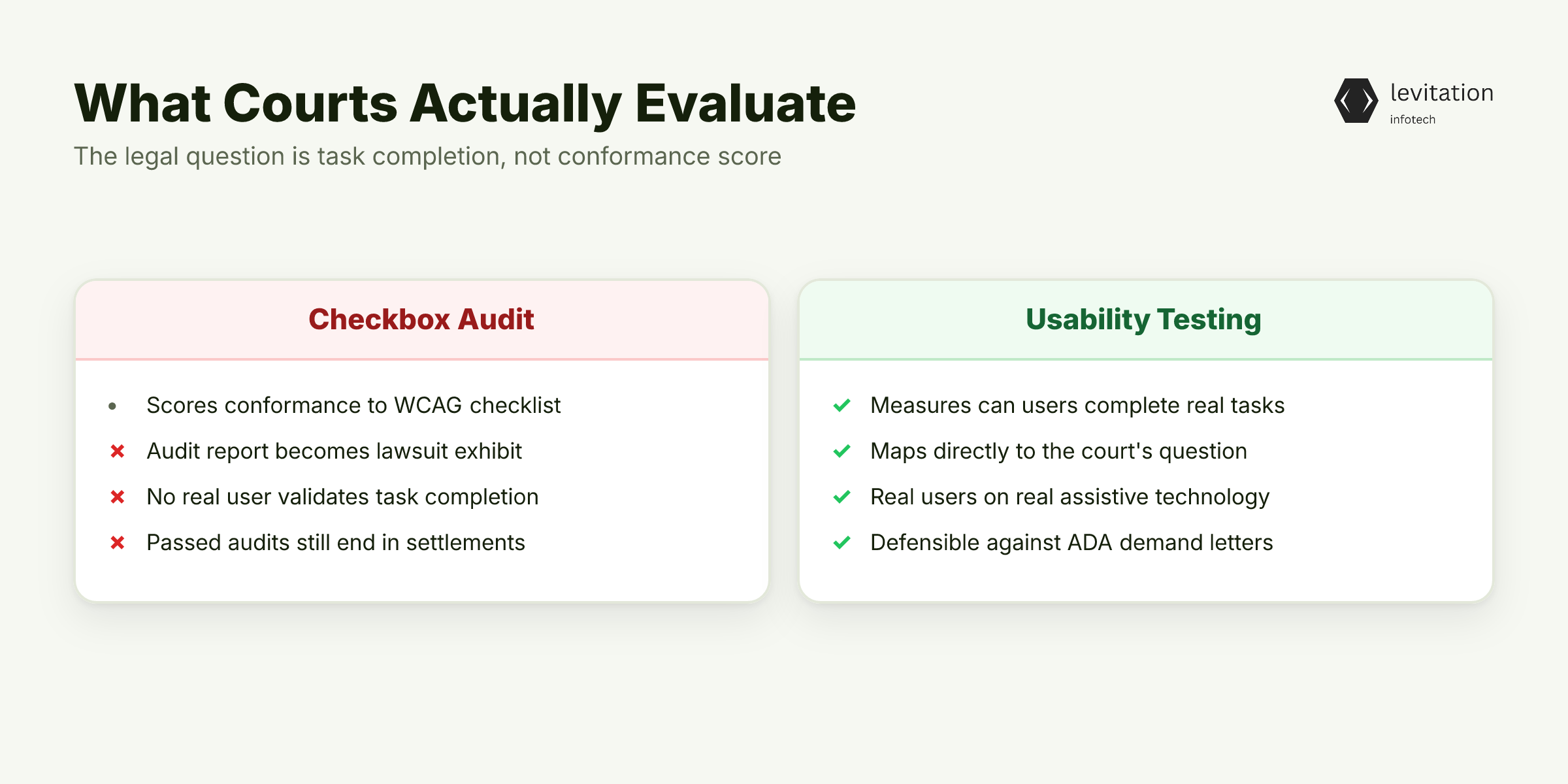
The de facto legal standard in the U.S. is WCAG 2.2 Level AA. But courts ask one practical question: can a person with a disability access and use this digital content? That question maps to task completion, not to a scorecard.
Most accessibility pressure comes through ADA litigation and demand letters, not regulatory audits. A real user is testing your site, not a checklist. The user files a complaint. They name the task they could not finish. Then the company either fixes it or settles.
Internationally, the European Accessibility Act and similar national frameworks now reference WCAG-aligned criteria. The risk surface for any platform serving the public sector is growing as digital service mandates tighten. Government, healthcare, and financial services are the highest-exposure verticals. They serve protected populations.
The litigation pattern is well documented. Companies with passed audits still get sued. The audit report becomes Exhibit A. It is evidence that the company knew about accessibility and failed to deliver it.
Usability testing is the only thing that maps to the legal question. So what does an expert audit stack actually look like? See our guide to ADA compliance for the full framework.
The Expert Audit Stack: Manual, Cognitive, and Screen Reader Testing
An expert audit is not a single activity. It is a stack of four layered tests, each catching a different class of failure.
Manual code review against WCAG 2.2 success criteria is the foundation. A certified auditor walks the actual DOM. They test with keyboard only. They inspect ARIA patterns that automated tools cannot parse. This is where accessible name calculation errors surface. This is where landmark structure is evaluated for screen reader navigation. This is where custom components are stress-tested against the spec.
Screen reader testing on real assistive technology is the evidence layer. NVDA on Firefox, JAWS on Chrome, VoiceOver on Safari, at minimum. The auditor finishes real user tasks: add to cart, fill a form, recover a password, log out. This is where the audit becomes evidence rather than opinion. Every task is recorded with timestamps, keystrokes, and screen reader output.
Cognitive walkthroughs with users who have disabilities are the reality check. The groups include blind, low-vision, motor-impaired, and cognitive disability profiles. Each group encounters different barriers. A motor-impaired user cannot click a small touch target. A low-vision user cannot read low-contrast text. A blind user cannot navigate a modal that traps focus.
Assistive technology test scripts document specific task completion rates. Can a screen reader user finish checkout? Can a switch-control user navigate the settings page without too much physical effort? The recorded metrics are what matter.
The depth needed explains why manual audits cost more than scanner reports. The remediation is also where the work happens. In HIPAA-regulated healthcare systems, accessibility failures in patient portals carry direct safety consequences, not just legal ones. That is why healthcare accessibility gets treated as a patient safety issue, not a checkbox.
An expert audit is necessary. But on its own it is a snapshot. The real failure mode is treating accessibility as an annual event rather than a delivery practice.
From Quarterly Audit to Continuous Accessibility Engineering
Treating accessibility as an engineering practice changes the cost equation. Here is the stack that works.
Integrate axe-core or Pa11y into CI pipelines so every pull request runs a baseline automated check before merge. This catches regressions, not completeness. A red CI build blocks a broken button label. A green CI build does not mean the site is accessible. It only means the regression suite passed.
Set up an accessibility champion in each squad, frontend, design, and QA. The champion owns a component library audited against WCAG 2.2. The library refuses new patterns that break the contract. This is how design systems become accessibility systems. It mirrors the same champion model that drives security outcomes in regulated stacks.
Build a remediation backlog ranked by user impact and legal exposure, not by which issue is easiest to fix. A broken focus trap on a payment form outranks a missing skip link on the about page. Triage by risk, not by effort.
Schedule screen reader testing every release cycle, not every fiscal year. Record the sessions for evidence. In any future litigation, the recordings show that accessibility testing was continuous, not performative. The bigger question for most CTOs is what this discipline actually costs versus what it returns.
The Real ROI: Beyond Avoiding Lawsuits
The cheapest reason to do accessibility is to avoid lawsuits. The better reason is what it unlocks. When screen reader users can actually finish core flows, you reach users most analytics dashboards undercount. This includes people with disabilities whose access patterns rarely show up in clickstream data.
Accessibility fixes tend to improve performance, mobile usability, and SEO at the same time. The reason is that accessible markup is cleaner markup. Semantic HTML loads faster than nested divs. Proper heading structure helps both screen readers and search crawlers. Alt text improves image search.
Audited accessible codebases are cheaper to maintain. Component patterns are standardized. Regressions surface in CI before production. New features inherit accessibility by default. For teams that want a structured engagement, our accessibility practice for regulated industries walks through scoping, deliverables, and remediation end-to-end. We have also published a Section 508 readiness checklist for public-sector buyers.
Frequently Asked Questions
Does passing a WCAG 2.2 audit protect against ADA lawsuits?
Not by itself. Courts evaluate whether a person with a disability can actually use the site. They do not look at whether an audit report exists. A passed audit is evidence of good faith. If a screen reader user cannot finish a core task, the audit does not shield you. This includes tasks like checkout or account login.
How much does a WCAG 2.2 accessibility audit cost?
Pricing for a manual expert audit scales with site complexity, depth of testing, and the deliverables needed. VPAT or ACR reports sit at the higher end. Automated-only audits are cheaper, but they cover only the surface patterns scanners can detect. That is why they fail in court.
Can overlay widgets make a site WCAG compliant?
No. The FTC has settled with overlay vendors for fake compliance claims. Class-action suits have followed. Overlays can patch some surface markup. But they cannot fix logical reading order, focus management, or component-level ARIA failures. They also often interfere with native screen reader behavior.
What is the difference between WCAG 2.1 and WCAG 2.2?
WCAG 2.2 adds new success criteria focused on cognitive and mobile users. These include Focus Not Obscured, Dragging Movements, and Target Size (Minimum). The foundational POUR principles are unchanged. 2.2 is backward compatible. Most legal frameworks (ADA, Section 508, EN 301 549) now reference 2.2 Level AA as the practical standard.
How long does a WCAG 2.2 audit take?
A thorough manual audit of a mid-complexity enterprise site spans several steps. These include kickoff scope definition, automated scanning, manual code review, screen reader testing, and a remediation report. The remediation itself runs as a separate workstream. Its duration depends on codebase debt.
About the author
Mayank Singh is a software developer at Levitation Infotech, where he builds web and AI-powered applications across the company’s fintech, healthcare, and enterprise projects.