


TL;DR: Salesforce's published price is not what Indian companies pay. Add implementation, admin retainers, AppExchange licenses, and amortized consulting, and the true per-seat cost lands around ₹18,000 per month. This breakdown shows where the gap comes from, when the premium is worth it, and when founders should walk away.
Key Takeaways: - The ₹1,500 figure reflects US Starter Suite list pricing; Indian resellers sell Pro Suite at ₹6,500-₹7,000+ per seat, with implementation adding thousands of rupees more per seat per month over three years - Salesforce India runs on GAIT pricing through authorized partners, which is why you cannot buy at US list and have a clean INR invoice - Year-two and year-three costs (admin retainers, AppExchange, sandbox environments) typically expand the total cost base as teams add users and modules - Salesforce earns its price for B2B companies with 30+ users, regulated data, or multi-cloud roadmaps, but is overkill for pre-PMF startups with transactional sales - Half-used CRMs cost more than no CRM because stale data erodes team trust in the system, a failure mode that hits even well-built deployments
The ₹1,500 Sticker Price Is Not What You Pay
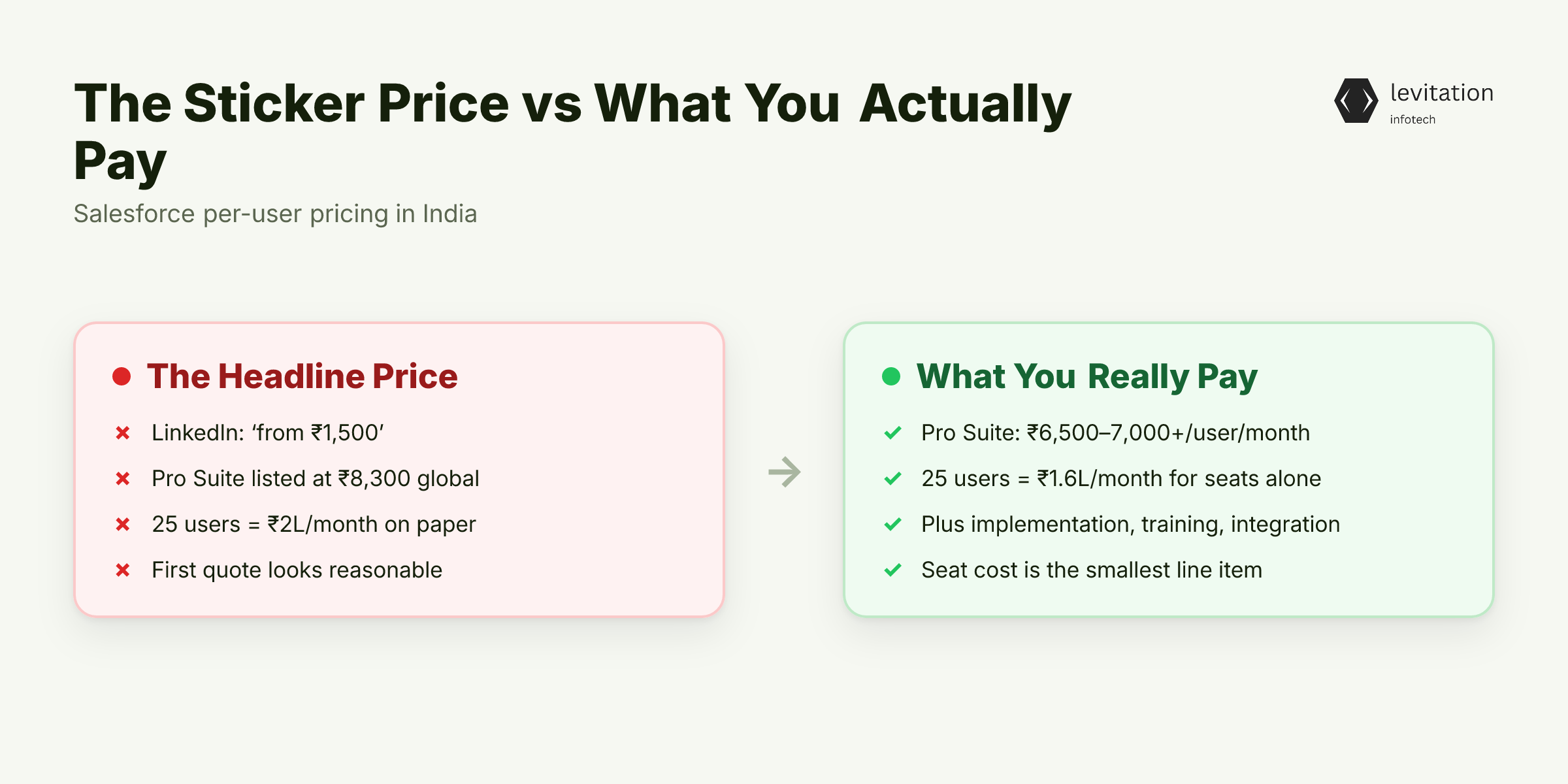
Salesforce.com lists Starter Suite at $25 per user per month and Pro Suite at $100 per user per month on its global site. In rupees, that is roughly ₹2,080 and ₹8,300. The "Salesforce starts at ₹1,500" headlines floating around LinkedIn come from older promotional pricing, bundle deals, or partner campaigns that hide the real cost.
In practice, Indian companies buying through authorized partners pay ₹6,500 to ₹7,000+ per user per month for Pro Suite. That 25-person sales team you would budget for at ₹2 lakh per month on paper? It lands closer to ₹1.6 lakh per month just for seats, before a single consultant signs on.
The seat price is the smallest line item. Implementation, training, integration, and ongoing admin work turn that sticker into a project budget. The real number is buried in what "implementation" actually includes.
When we scope CRM implementations for Indian companies, the gap between sticker and landed cost is where most budget blowouts happen. The first quote looks reasonable. The third quote reveals what was never in scope.
What '₹18,000 Per Seat' Actually Includes
The ₹18,000 fully-loaded figure is not pulled from a marketing deck. It is what a per-seat-per-month cost actually looks like when you amortize everything across a three-year deployment for a mid-sized team.
Here is the rough cost stack: - Seat license (Pro Suite): ~₹7,000 per user per month - Implementation, amortized over 3 years: adds a per-seat cost that varies with team size, cloud scope, and customization depth - Admin retainers, training, and integration maintenance: ongoing costs that fill the gap to the fully-loaded range
Together, these line items land in the ₹16,000-₹21,000 range per seat per month. The headline ₹18,000 figure sits in the middle.
Implementation costs in India range from ₹5 lakh for a tight single-cloud rollout to ₹5 crore or more for complex enterprise projects with payment gateway integration, ERP sync, and custom reports. Custom Apex development, third-party connector licenses, and sandbox environments increase the total cost beyond the base implementation quote because each layer adds hours and licensing fees.
If implementation costs are public, why does every quote land differently? Because what gets included is where partners hide margin. One quote covers only configuration. Another bundles data migration, training, and six months of post-go-live support. Same line item. Very different outcomes.
Why Indian Resellers Won't Sell at List Price
Salesforce in India is sold almost exclusively through authorized partners, not direct. Partners bundle implementation, support, and first-year managed services into the per-seat quote because the partner model requires it.
GAIT (Global, Allocated, India Tier) pricing reflects FX hedging, local support overhead, and the partner's margin layer. You cannot bypass it without an India entity purchasing the US SKU directly, which most mid-market companies cannot do.
The friction goes beyond pricing. DPDPA compliance, GST invoicing in INR, and TDS on software imports add layers that direct global procurement teams never face. If you are importing a US SKU, your finance team handles withholding tax calculations your vendor will not do for you. If you buy through a local partner, the invoice is clean and your CA signs off in minutes.
We walk founders through this trade-off in our DPDPA compliance checklist for SaaS, because the cheapest path on paper is rarely the cheapest after tax and compliance work.
Once you understand the reseller model, the cost stops looking like a rip-off and starts looking like a structural problem. The next question is how long the project actually takes.
The Timeline That Breaks Every Founder's Budget
A focused single-cloud Salesforce implementation for 20-40 users takes 4-8 weeks. The same project with payment gateway integration, ERP sync, and custom reports runs 3-4 months. Multi-cloud projects (Sales + Service + Marketing Cloud) for 100-300 users typically span 3-6 months. Enterprise rollouts with custom Apex and ERP integration hit 9-18 months.
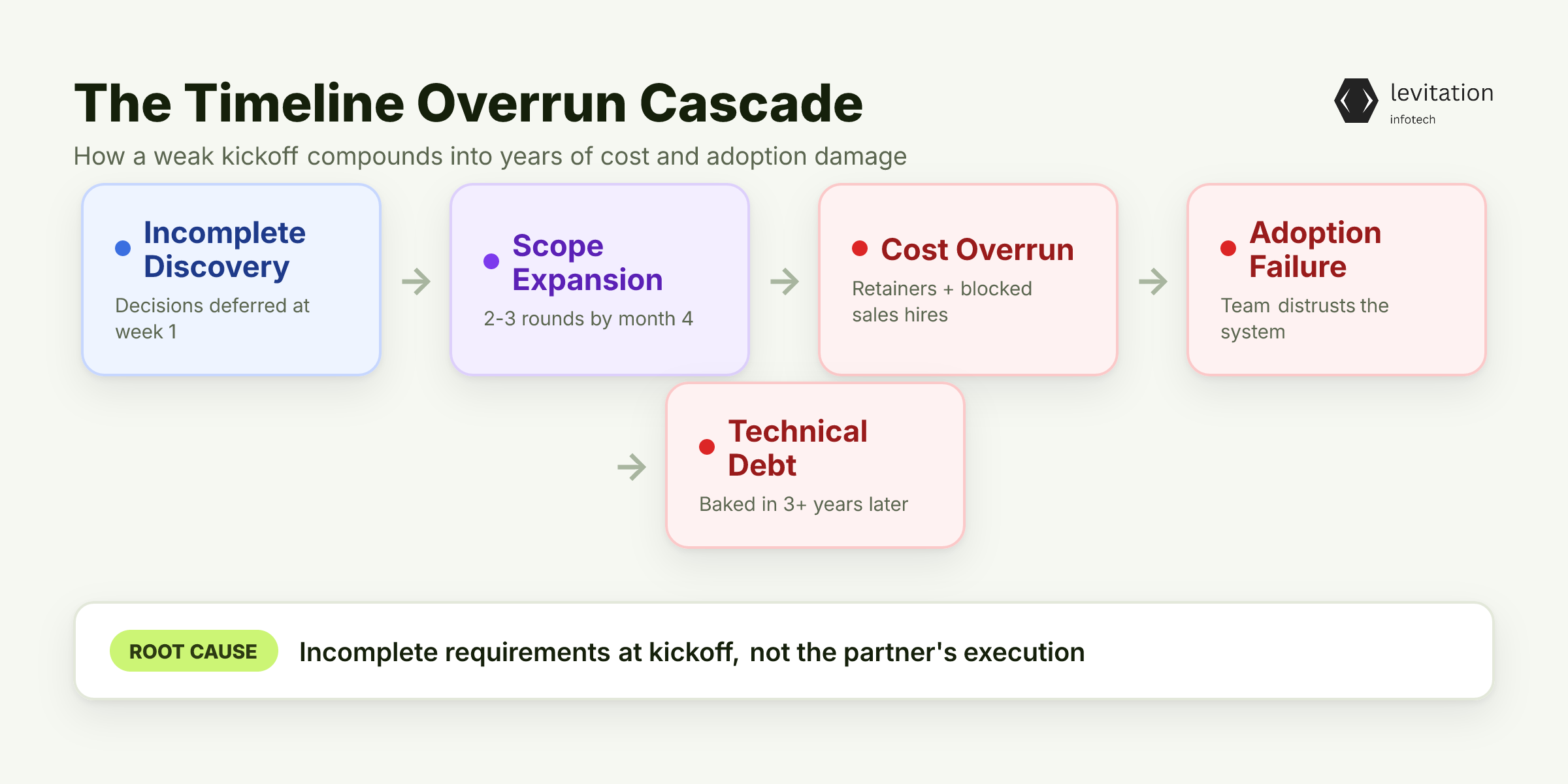
The most common cause of timeline overrun is incomplete requirements at kickoff, not the partner's execution. Founders who skip discovery end up funding two or three rounds of scope expansion because decisions that should have been made in week one surface in month four.
Timeline overruns cascade into cost overruns through contractor retainers and internal team drag. Every additional month is another month of paid consultants, blocked sales hires, and integration partners on standby. The math gets ugly fast, and the overruns compound into adoption failures twelve months later when the team never fully trusts the system.
What makes this worse: many of these systems are still running in production five or more years after deployment, with original scope creep baked into the architecture. Decisions made under deadline pressure in month four become technical debt the team inherits in year three.
The bigger leak, though, is what happens after go-live.
The Year-Two and Year-Three Costs Nobody Quotes
Salesforce releases three major updates per year. Each one can break custom workflows, Apex code, and integrations, requiring a dedicated admin or part-time consultant to test, patch, and redeploy. Most teams underestimate this work because year one feels stable.
User licensing typically grows by year two as teams expand and new modules get added. What started as a Sales Cloud rollout becomes Service Cloud in month fourteen and Marketing Cloud Account Engagement in month twenty. Each module adds seats, training, and integration work.
Then come the AppExchange apps you trialed in year one. Marketing Cloud Account Engagement, DocuSign, and Einstein AI add-ons all carry separate license fees that stack on top of Pro Suite pricing. These were "free trials" twelve months ago. Now they are line items.
The pattern shows up in nearly every project we audit. In our work with regulated-industry rollouts, year-three TCO almost always exceeds the year-one quote once admin retainers, AppExchange, and module expansion stack on top of base license growth, because each year's additions compound the previous year's base.
Knowing the three-year cost lets you pressure-test the vendor quote. The next step is deciding whether Salesforce is the right choice at all.
The Founder's Pre-Salesforce Decision Checklist
Most Salesforce regret starts before the contract is signed. Founders buy on demo-day excitement and discover operational friction six months later. The fix is a checklist that forces honesty before procurement.
Step 1: Write down the three operational problems Salesforce must solve. "Improve customer experience" is not a use case. "Reduce lead-to-quote cycle from 14 days to 5" is. If you cannot list three specific, measurable problems, you are not ready for a CRM that costs this much.
Step 2: Calculate the three-year TCO. The formula: (seats x ₹7,000 x 36) + implementation (₹5L-₹25L) + admin retainer (₹50K-₹2L per month) + AppExchange (₹2L-₹10L per year). If the total crosses ₹1 crore and your ARR is under ₹5 crore, the math is wrong.
Step 3: Validate that your team will actually log in. Adoption rates under 60% are common. A half-used CRM is more expensive than no CRM because the data goes stale and the team loses trust in the system. CRM adoption is a culture problem, not a feature problem, and our work with NCR brokers shows how adoption gaps sink even well-built systems.
Step 4: Pressure-test the timeline against [Indian CRM project benchmarks](/posts/why-indian-crm-projects-hit-2x-budget). If the partner promises 8 weeks for a multi-cloud project, you are about to fund 16.
If the checklist still says yes, the question shifts to which implementation partner can deliver it without the typical overruns. Book a CRM scoping call if you want an independent read on your requirements before signing anything.
When Salesforce Earns Its Price, and When You Should Walk Away
Salesforce is worth the premium if you are a B2B company with 30+ sales users, complex approval workflows, regulated data (healthcare, BFSI), or a planned multi-cloud expansion within 18 months. The platform's depth pays for itself when your deals are complex, your data is sensitive, and your integration needs span ERP, finance, and support.
Walk away if you are pre-product-market-fit, have under 20 users, sell transactional deals, or only need pipeline tracking. HubSpot, Zoho CRM, or Freshsales deliver 80% of the value at 20% of the cost. We have seen NCR builders outgrow Salesforce at 20 users and Zoho's ₹1,500 seat become a ₹6,000 reality by year two. The pattern repeats: wrong tool, wrong stage.
For regulated industries where security and audit trails are non-negotiable, the premium buys you DPDPA-ready infrastructure, SOC 2 compliance, and integrations that lighter CRMs cannot match. The ₹18,000 per seat stops looking inflated and starts looking rational. Levitation has shipped enterprise rollouts for regulated industries, including banks, with systems still running in production five-plus years later. See our CRM implementation work.
The question is not "Is Salesforce expensive?" It is "Is the ₹18,000 per seat the cheapest way to solve my three specific problems?" If the answer is yes, the cost is rational. If the answer is "I think so," the cost is a gamble.
Frequently Asked Questions
How much does Salesforce implementation cost in India for a small business?
For a 20-40 user team on a single cloud, implementation in India typically costs ₹5 lakh to ₹25 lakh. Multi-cloud projects for 100+ users run ₹50 lakh to several crore depending on integration depth, custom development, and data migration scope. The variance is driven almost entirely by requirements clarity, not partner pricing.
Why is Salesforce more expensive in India than the US-listed price?
Salesforce in India is sold through authorized partners at GAIT pricing, which bundles implementation, local support, GST-compliant invoicing, and FX hedging into the per-seat quote. Indian resellers price Pro Suite at ₹6,500-₹7,000+ per user per month, but that INR quote is the only one with INR invoicing and India-based support.
What are the hidden ongoing costs of Salesforce after year one?
Year-two and year-three costs include a part-time admin or consultant, AppExchange add-on licenses (Marketing Cloud Account Engagement, DocuSign, Einstein AI), sandbox environment costs, and integration maintenance. Most teams see year-over-year seat growth as they add modules and users, which compounds the base license cost.
Is Salesforce worth it for a startup in India?
For pre-PMF startups with under 20 users and transactional sales cycles, Salesforce is almost always overkill. Zoho CRM, HubSpot, or Freshsales deliver 80% of the pipeline-tracking value at 20% of the cost. Salesforce becomes justified around 30+ sales users, B2B deal complexity, or any regulated data requirement.
How long does a Salesforce implementation take in India?
A focused single-cloud rollout for 20-40 users takes 4-8 weeks. Multi-cloud implementations for 100-300 users run 3-6 months. Enterprise projects with custom Apex, ERP integration, and data migration can take 9-18 months. Timeline overruns are almost always caused by incomplete requirements at kickoff.
About the author
Mayank Singh is a software developer at Levitation Infotech, where he builds web and AI-powered applications across the company’s fintech, healthcare, and enterprise projects.