


TL;DR
Fintech CTOs watch GPU bills explode despite autoscaling. Hidden fees, premium on-demand rates, and volatile spot markets drive the gap. A data-driven mix of right-sizing, reserved capacity, and policy-aware scaling can cut spend dramatically.
Key Takeaways - 73 % of fintechs underestimate 2024 GPU autoscaling spend. - GPU instances cost 10-20× more than comparable CPUs; egress fees add surprise costs. - A disciplined mix of reserved, spot, and policy-driven scaling can slash GPU bills by 30-50 % by 2026.
The hidden cost gap in GPU autoscaling
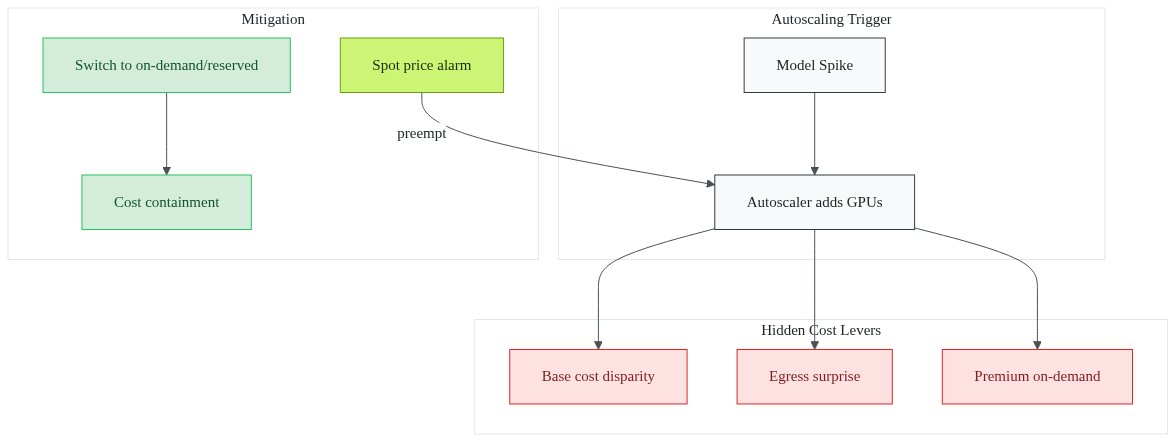
Fintech leaders often assume “autoscale = cost-neutral.” In reality, projected spend and actual invoices diverge sharply. A recent study shows 73 % of Indian fintechs miss their 2024 GPU autoscaling budget. The mismatch is baked into the pricing model.
GPU instances carry a base price that dwarfs CPU equivalents - ten to twenty times higher per hour. When a model spikes, the autoscaler adds more GPUs, and the bill balloons overnight. Egress fees appear only after a burst moves data across regions or out of the cloud. Those fees stay invisible in dashboards until the next invoice.
1# Example: Spot price spike detection2aws cloudwatch put-metric-alarm \3 --alarm-name GPU-Spot-Price-High \4 --metric-name SpotPrice \5 --namespace AWS/EC2Spot \6 --threshold 0.12 \7 --comparison-operator GreaterThanThreshold \8 --evaluation-periods 2 \9 --period 300 \10 --statistic Average \11 --actions-enabled
The alarm flags a price surge before the autoscaler reacts. Then it gives a chance to switch to on-demand or reserved capacity. - Base cost disparity: GPU > CPU by 10-20×. - Egress surprise: Charged only after cross-region data moves. - Premium on-demand: Capacity crunch forces higher rates.
These hidden levers turn a “set-and-forget” autoscaler into a money-leak. What causes these hidden fees to appear?
Why simple autoscaling rules fall short
A naïve rule like “scale when CPU > 70 %” ignores the GPU market’s quirks. Spot-market prices can swing by dozens of percent in minutes. When a fraud-detection model spikes, the autoscaler may request spot GPUs at a price that has just jumped. As a result, it blows the budget.
Egress fees surface only after a scaling burst pushes data through a VPC peering link. The cost appears as a line item labeled “Data Transfer Out.” However, most teams don’t monitor it in real time. Capacity constraints compound the issue. If the preferred GPU type is unavailable, the cloud provider offers an on-demand premium. That premium can be two-to-three times the spot price.
1# Terraform snippet: tiered GPU scaling policy2resource "aws_autoscaling_policy" "gpu_policy" {3 name = "gpu-scale"4 autoscaling_group_name = aws_autoscaling_group.gpu_asg.name56 scaling_adjustment = var.use_spot ? -1 : 17 adjustment_type = "ChangeInCapacity"89 metric_aggregation_type = "Average"10 estimated_instance_warmup = 30011}
The policy toggles between spot and on-demand based on a flag that reflects current market price. Without such logic, a simple threshold repeatedly over-provisions. - Spot volatility: Prices can jump sharply, breaking static thresholds. - Egress after bursts: Data transfer costs hide in post-scale invoices. - Capacity premiums: Unavailable GPU types force expensive on-demand swaps.
Can data-driven tactics close the gap?
Data-driven strategies that cut GPU spend 30-50 %
The answer isn’t “more GPUs.” It’s a disciplined, data-first approach that matches workload characteristics to the cheapest viable compute. Three tactics consistently deliver 30-50 % savings by 2026.
- Use-based right-sizing - Continuously monitor GPU memory and core use. When average use stays below 40 %, downgrade to a smaller instance or switch to CPU for that batch.
- Reserved instances for baseline load - Identify the predictable portion of your AI pipeline (e.g., nightly model retraining). Then lock it in a one- or three-year reservation. The reservation cuts the hourly rate dramatically compared with on-demand.
- Hybrid spot/on-demand mix - Allocate 70 % of burst capacity to spot GPUs. Then keep a 30 % buffer of on-demand instances ready for failover. The buffer prevents throttling while the spot pool captures cheap compute.
Embedding compliance checks into scaling policies ensures that KYC/AML data never leaves a trusted zone. Then it avoids costly regulatory penalties.
1# Policy: enforce compliance zone before scaling2if (new_gpu_request) {3 require(data_residency == "in-region");4 require(encryption_at_rest == true);5}
- Right-size: Cuts idle GPU hours. - Reserve: Locks down baseline cost. - Hybrid: Balances cheap spot with reliability.
How can you turn these tactics into a concrete plan?
Actionable roadmap for fintech CTOs

Turning insight into action requires a clear audit, policy engine, and monitoring stack. Follow these steps to move from “leaking spend” to “predictable budget.”
- Audit current GPU use - Use profiling tools like NVIDIA Nsight or CloudWatch dashboards to capture per-job use, duration, and egress patterns. Export the data to a CSV for analysis.
- Define predictive scaling policies - Write Terraform or CloudFormation configs that reference use thresholds and market price signals. Example Terraform snippet:
1resource "aws_autoscaling_group" "gpu_asg" {2 name = "fintech-gpu-asg"3 max_size = 204 min_size = 25 desired_capacity = 56 launch_configuration = aws_launch_configuration.gpu_lc.id78 tag {9 key = "Environment"10 value = "Production"11 propagate_at_launch = true12 }1314 lifecycle {15 create_before_destroy = true16 }17}
- Integrate compliance validation - Hook a Lambda function into the scaling webhook. The function checks that any new GPU request respects KYC data residency and encryption policies. Then it approves the scale-out.
- Adopt a proven deployment cadence - Using a ready-made framework can deliver a production-ready GPU autoscaling stack in 3-6 months, compared with 18-24 months for a fully custom build. Then the faster cadence reduces engineering overhead and gets savings realized sooner.
- Monitor cost anomalies - Set up a Grafana dashboard that alerts on sudden spikes in GPU spend, egress volume, or spot price deviation. Then pair the alert with an automated rollback to reserved capacity.
What does success look like after the plan is live?
What success looks like - and why it matters
When the roadmap is live, fintechs see concrete benefits. GPU spend drops by up to half, freeing budget for new product features. Faster iteration cycles translate into a competitive edge. A fraud-detection model can be retrained weekly instead of monthly, catching threats earlier.
Compliance-aware scaling eliminates the risk of accidental data egress, protecting against regulatory penalties that could dwarf compute costs. Predictable budgeting smooths cash-flow forecasts, making it easier to secure investor confidence.
Long-term stability shows in multi-year production runs. Companies that adopt the disciplined approach keep the same GPU fleet in production for over five years. Then they prove that the cost model scales with business growth.
Frequently Asked Questions
Q: How can I accurately forecast GPU autoscaling costs for a fintech AI workload?
A: Start with a baseline audit of current use. Then apply tiered pricing models (on-demand, reserved, spot) and factor in egress and capacity-premium fees. Continuous monitoring and predictive scaling rules keep forecasts aligned with reality.
Q: Do reserved GPU instances violate Indian fintech compliance requirements?
A: Reserved instances are neutral; compliance hinges on data residency, encryption, and audit trails. Pair reserved GPUs with a compliant cloud provider and embed policy checks in your scaling pipeline.
Q: What’s the biggest hidden fee when using GPU autoscaling?
A: Egress bandwidth charges often appear only after a scaling event. Especially when data moves between regions or out of the cloud, they add cost. Tracking network use alongside compute prevents surprise invoices.
Q: Can spot instances be used for latency-sensitive fraud-detection models?
A: Yes, if you design a fallback to on-demand GPUs for critical spikes. Use spot for batch-or-train workloads and keep a small buffer of on-demand capacity for real-time inference.
Q: How long does it take to implement a cost-optimized GPU autoscaling strategy?
A: With a ready framework, a typical fintech can go from audit to production in 3-6 months. Then it compares with 18-24 months for a fully custom build.
Sources
Research and references cited in this article:
- The Hidden Costs of Hyperscaler GPUs in Financial Services
- India's GPU Infrastructure Utilization Lags Behind Capacity Buildout
- Why GPU Costs Explode as AI Products Scale | Real Drivers Explained
- Cost-Efficient Autoscaling Strategies for AI Workloads - CloudOptimo
- Optimize GPU Utilization in Financial Services: Cut AI Costs and Boost Performance
- Cloud Cost Optimization in 2026: What Actually Saves Money in an ...
- 11 cloud cost optimization strategies and best practices for 2026 | Blog
- Cloud Cost Optimization 2026: Visibility to Automation - Sedai
- AI-Powered Cloud Cost Optimization: Best Practices for FinOps
- FinOps + AI: How to Hyper-Automate Cloud Cost Optimization
- AI Development Services for Financial Services in 2026: Regulatory Compliant AI Systems
- AI Trends in FinTech 2026: Automation, AI Agents & Innovation
About the author
Mayank Singh is a software developer at Levitation Infotech, where he builds web and AI-powered applications across the company’s fintech, healthcare, and enterprise projects.