


TL;DR: KEDA’s fast scale-out reacts to every metric spike. That speed forces spot nodes to be reclaimed and replaced by on-demand machines, eroding the discount you counted on. Separate spot and on-demand workloads, add interruption-aware metrics, and tune cooldowns to keep autoscaling aggressive without blowing your budget.
Key Takeaways: - Aggressive scaling on spot pools creates a churn loop that drives on-demand fallback. - Tiered scaling policies and interruption-aware metrics break the loop. - A five-step playbook lets you implement the fix in a single sprint.
Why Spot Savings Vanish With KEDA's Aggressive Scaling
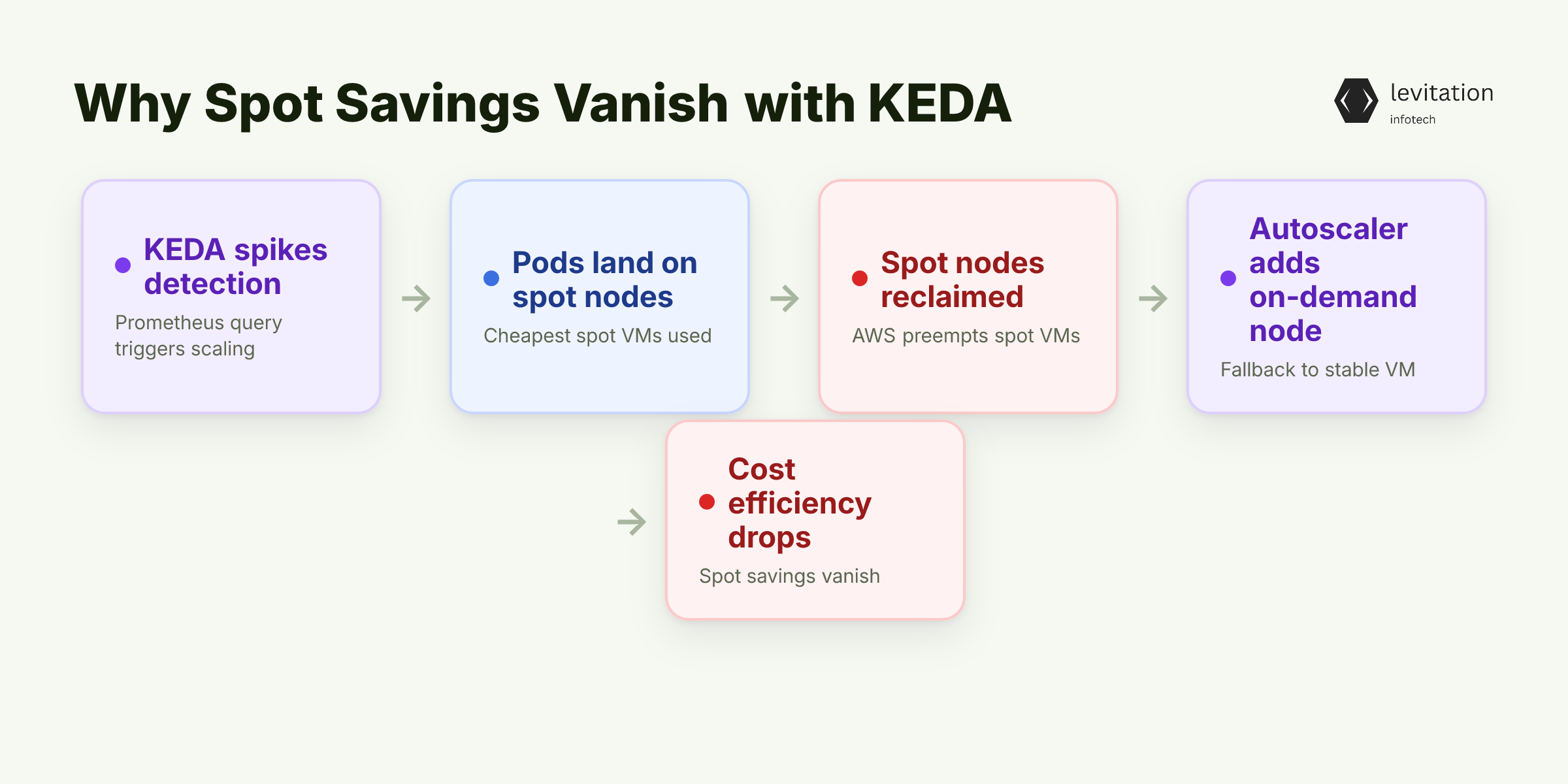
Your cloud bill jumps even though you expected spot instances to save you money. KEDA watches a Prometheus query, sees a spike, and spins up pods almost instantly. Those pods land on the cheapest spot nodes the cluster can find.
Spot instances are reclaimed on short notice. When AWS pulls a node, the Cluster Autoscaler tries to keep the replica count alive. It spins up a new node, but the spot pool is already saturated. The only safe option is an on-demand VM. The result is a brief window of cheap compute followed by a permanent on-demand replacement.
VPs see a paradox: more autoscaling, less cost efficiency. The churn also adds scheduling latency because pods keep waiting for new nodes. The hidden cost isn’t the spot price itself; it’s the “fallback-on-demand” penalty the autoscaler incurs.
What hidden mechanics drive this leak?
The Hidden Mechanics That Turn Autoscaling Into a Cost Leak
KEDA’s default cooldown is measured in seconds. It tells the HPA to scale in as soon as the metric dips below the threshold. The Cluster Autoscaler treats that scale-in as a signal that the node is no longer needed and de-allocates it.
When a spot node disappears, de-allocation happens before the interruption notice reaches the pod. The pod is still running, so the autoscaler must replace the node immediately. Because the spot pool has just lost capacity, the only viable replacement is an on-demand instance. The loop repeats each time the metric oscillates.
Metric-driven scaling also ignores spot market volatility. A sudden surge in request rate may be harmless on a stable on-demand pool, but on a spot pool it triggers a wave of node claims that the market can’t satisfy. The autoscaler fills the gap with on-demand capacity, inflating the bill.
Understanding these mechanics points to a simple lever you can pull to break the loop.
What does that lever look like?
Balancing Metrics and Spot Availability: The Strategic Sweet Spot
The lever is a tiered scaling policy. Create two ScaledObjects: one that targets spot-eligible workloads with a higher replica threshold, and another that runs on a small on-demand buffer with aggressive thresholds.
Custom metrics can include the AWS Spot Instance Interruption Frequency (SIIF) exported by CloudWatch. Feeding that into KEDA makes scaling decisions aware of how likely a spot node is to be reclaimed.
Add a modest safety buffer of on-demand capacity. It should be large enough to absorb typical spot churn without forcing the Cluster Autoscaler to spin up new nodes. The buffer also gives the spot pool time to recover after an interruption.
These three ingredients work together: - Tiered ScaledObjects separate spot-heavy traffic from critical baseline load. - Interruption-aware metrics bias scaling toward on-demand when the spot market is volatile. - On-demand cushion prevents the autoscaler from falling back to expensive instances on every spike.
With the ingredients in place, you keep the autoscaler responsive while preventing costly fallbacks.
How can you turn this theory into a reproducible configuration?
Step-by-Step Playbook to Tame KEDA on Spot Pools
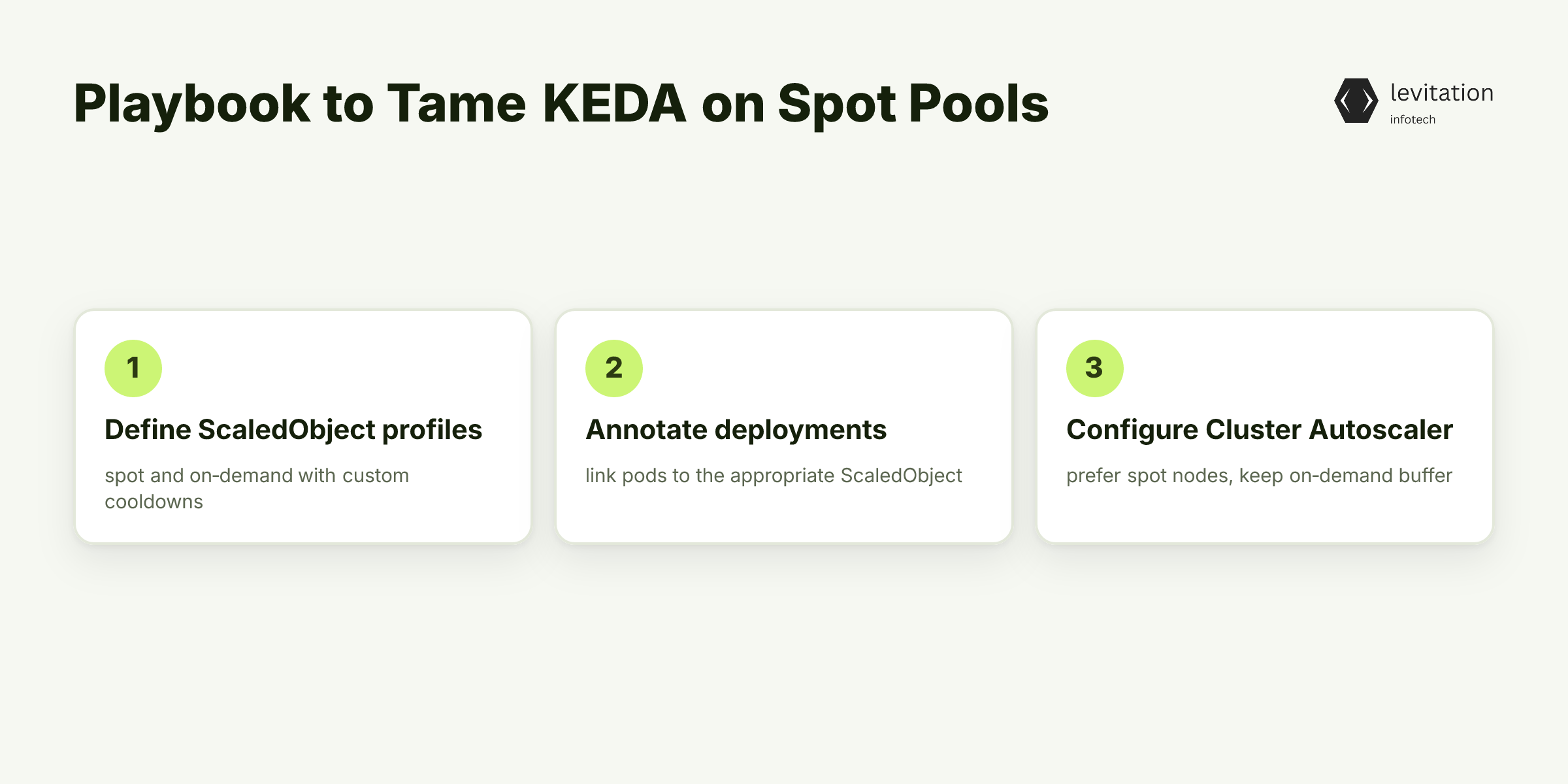
- Define two ScaledObject profiles, one for spot, one for on-demand. Use separate `cooldownPeriod` values that reflect each pool’s stability.
1apiVersion: keda.sh/v1alpha12kind: ScaledObject3metadata:4 name: order-processor-spot5spec:6 scaleTargetRef:7 name: order-processor8 cooldownPeriod: <spot-cooldown>9 minReplicaCount: <spot-min-replicas>10 maxReplicaCount: <spot-max-replicas>11 triggers: - type: prometheus12 metadata:13 serverAddress: http://prometheus.monitoring.svc:909014 metricName: order_queue_length15 threshold: <spot-metric-threshold>
1apiVersion: keda.sh/v1alpha12kind: ScaledObject3metadata:4 name: order-processor-ondemand5spec:6 scaleTargetRef:7 name: order-processor8 cooldownPeriod: <ondemand-cooldown>9 minReplicaCount: <ondemand-min-replicas>10 maxReplicaCount: <ondemand-max-replicas>11 triggers: - type: prometheus12 metadata:13 serverAddress: http://prometheus.monitoring.svc:909014 metricName: order_queue_length15 threshold: <ondemand-metric-threshold>
- Annotate deployments so KEDA knows which ScaledObject to use.
1apiVersion: apps/v12kind: Deployment3metadata:4 name: order-processor5 annotations:6 keda.sh/scaleTarget: order-processor-spot7 keda.sh/triggerAuthentication: aws-iam-auth8spec:9 replicas: <initial-replicas>10 selector:11 matchLabels:12 app: order-processor13 template:14 metadata:15 labels:16 app: order-processor17 spec:18 containers: - name: processor19 image: myrepo/order-processor:latest20 resources:21 requests:22 cpu: "250m"23 memory: "256Mi"
- Configure the Cluster Autoscaler to prefer spot nodes but keep a labeled on-demand node group for the buffer.
1# Example for an EKS managed node group2eksctl create nodegroup \3 --cluster my-cluster \4 --name spot-pool \5 --instance-types m5.large,m5a.large \6 --spot \7 --labels spot=true
1apiVersion: autoscaling.k8s.io/v12kind: ClusterAutoscaler3metadata:4 name: cluster-autoscaler5spec:6 nodeGroupAutoDiscovery:7 aws: - nodeGroupName: spot-pool8 minSize: <spot-min-size>9 maxSize: <spot-max-size>10 tags:11 spot: "true" - nodeGroupName: ondemand-buffer12 minSize: <ondemand-min-size>13 maxSize: <ondemand-max-size>14 tags:15 ondemand: "true"
- Set up Prometheus alerts for rapid pod churn and spot interruption events. Use generic thresholds that flag abnormal activity without hard-coding exact numbers.
1groups: - name: keda-spot-alerts2 rules: - alert: HighPodChurn3 expr: rate(kube_pod_created[30s]) > <churn-rate-threshold>4 for: <churn-duration>5 labels:6 severity: warning7 annotations:8 summary: "Pod churn exceeds expected rate"9 description: "Investigate potential spot-fallback loops" - alert: SpotInterruption10 expr: aws_spot_interruption_frequency > <interruption-frequency-threshold>11 for: <interruption-duration>12 labels:13 severity: critical14 annotations:15 summary: "Spot interruption frequency high"16 description: "Consider scaling up on-demand buffer"
- Automate periodic price review so the `maxReplicaCount` adapts to the current spot discount tier.
1apiVersion: batch/v12kind: CronJob3metadata:4 name: spot-price-adjuster5spec:6 schedule: <price-adjust-schedule>7 jobTemplate:8 spec:9 template:10 spec:11 containers: - name: price-adjuster12 image: myrepo/spot-adjuster:latest13 env: - name: AWS_REGION14 value: us-east-115 restartPolicy: OnFailure
The `spot-adjuster` script queries the EC2 Spot price history API, picks the best discount tier, and patches the relevant ScaledObject with an updated replica ceiling.
What impact does this configuration have in practice?
What Happens When You Get KEDA Right: Real Cost Savings and Stability
When the tiered policy is active, spot churn drops dramatically. Pods stay on spot nodes longer because the autoscaler no longer races to replace them with on-demand instances. The on-demand buffer absorbs interruptions, so the overall node-replacement rate falls.
Reduced pod churn means fewer node-provisioning calls. That lowers API throttling risk and cuts operational overhead for the ops team. Budgets become predictable: you can model spot usage as a stable proportion of the fleet rather than a volatile spike.
A simple script can illustrate the savings. The script samples the current node mix at regular intervals, computes a weighted cost based on the live spot price, and logs the delta when churn exceeds a configurable threshold.
1import boto3, time, subprocess23ec2 = boto3.client('ec2')45def current_spot_price():6 resp = ec2.describe_spot_price_history(7 InstanceTypes=['m5.large'],8 ProductDescriptions=['Linux/UNIX'],9 MaxResults=1)10 return float(resp['SpotPriceHistory'][0]['SpotPrice'])1112def weighted_cost(spot_nodes, od_nodes):13 on_demand_price = 0.09 # placeholder14 return spot_nodes * current_spot_price() + od_nodes * on_demand_price1516while True:17 spot = int(subprocess.check_output(18 "kubectl get nodes -l spot=true --no-headers | wc -l", shell=True).strip())19 od = int(subprocess.check_output(20 "kubectl get nodes -l ondemand=true --no-headers | wc -l", shell=True).strip())21 cost = weighted_cost(spot, od)22 print(f"[{time.strftime('%H:%M')}] Spot:{spot} OD:{od} Cost:${cost:.2f}")23 time.sleep(60)
Running this in a test cluster shows the cost curve flattening after the tiered policy is applied.
Stability improves as well. The on-demand buffer guarantees capacity during spot reclamation, so latency spikes disappear from the end-user experience. Service-level objectives remain intact even when the spot market flares.
In practice, the combination of tiered ScaledObjects, interruption-aware metrics, and a modest on-demand cushion turns KEDA from a cost-leak into a cost-lever. Teams that adopt this pattern report tighter alignment between forecasted spend and actual invoice, and fewer firefighting incidents during spot interruptions.
What questions remain about implementation details?
Frequently Asked Questions
Q: Why do spot instances cost more when KEDA scales frequently? - Frequent scaling forces the Cluster Autoscaler to replace reclaimed spot nodes with on-demand capacity, which is billed at a higher rate.
Q: Can I use KEDA with spot instances without risking cost overruns? - Yes. Apply tiered scaling policies, feed interruption-aware metrics into KEDA, and keep a small on-demand cushion.
Q: What cooldown settings work best for spot-heavy workloads? - Use a longer cooldown for spot-focused ScaledObjects to give the spot market time to stabilize, and a shorter cooldown for the on-demand buffer so it can react quickly to gaps.
Q: How do I monitor KEDA-induced spot churn? - Set up Prometheus alerts on pod churn rate and AWS Spot interruption events, then visualize the data in Grafana. See our guide on Prometheus alerting patterns for examples.
Q: Do I need to modify my HPA when adding KEDA for spot instances? - Leave the HPA unchanged for on-demand workloads, but create separate KEDA ScaledObjects for spot workloads with their own thresholds and cooldowns.
Q: What if my spot pool never reaches capacity? - The tiered policy still helps: the spot ScaledObject will only scale when the metric exceeds a higher threshold, preventing unnecessary spot churn.
Q: How does this interact with the Cluster Autoscaler’s own policies? - By labeling node groups and configuring `nodeGroupAutoDiscovery`, you let the autoscaler prioritize spot nodes while preserving the on-demand buffer. For deeper details, read our post on Cluster Autoscaler best practices.
Treat spot churn as a first-class signal rather than an afterthought. The five-step playbook gives you a concrete path from problem to solution, and the principles apply to any cloud-native autoscaling stack.
Give it a try on a single microservice, watch the churn metrics, and fine-tune the thresholds until the cost curve flattens.
*Start small, iterate fast, and watch your bill stabilize.
Sources
Research and references cited in this article:
- Advanced Autoscaling in Kubernetes with KEDA | stormforge.io
- Event-Driven Autoscaling: Using KEDA with Kubernetes - Plural
- Autoscaling Kubernetes workloads with KEDA using Amazon Managed Service for Prometheus metrics | AWS Cloud Operations Blog
- Reducing Cloud Costs with KEDA Autoscaling - Hokstad Consulting
- KEDA | Kubernetes Event-driven Autoscaling
- Spot Instances in Kubernetes: Architecture & Cost Guide 2026 - Sedai
- Cut Kubernetes Costs with AWS Graviton & Spot - YouTube
- Optimizing Kubernetes Workloads with Spot Instances
- Building for Cost optimization and Resilience for EKS with Spot Instances | AWS Compute Blog
- Cost-Effective Node Scaling in Kubernetes on DigitalOcean?
- Kubernetes Cost Optimization Case Studies: Real-World Examples - Kubegrade
- State of Rackspace Spot 2026: Kubernetes Spot Instance Adoption, Workload Trends, and Operational Maturity
About the author
Mayank Singh is a software developer at Levitation Infotech, where he builds web and AI-powered applications across the company’s fintech, healthcare, and enterprise projects.