


TL;DR: Most tools sold as "AI agents" today are LLMs wrapped in a chat window. They generate text. They don't act. A real AI agent runs a closed loop. It reads state, picks a tool, executes, and observes the result. Then it decides what's next, without waiting for a human prompt. Knowing the difference shapes what you buy, what you build, and what you actually save.
Key Takeaways: - A real AI agent uses tools to change state in your systems. It does not just reply to a chat. - Autonomy is a spectrum, not a checkbox. Most "AI assistants" sit at the lowest end. - Production agents are measured by what survives year three, not what dazzled at the demo.
Most "AI Tools" You Bought Last Year Aren't Actually AI Agents
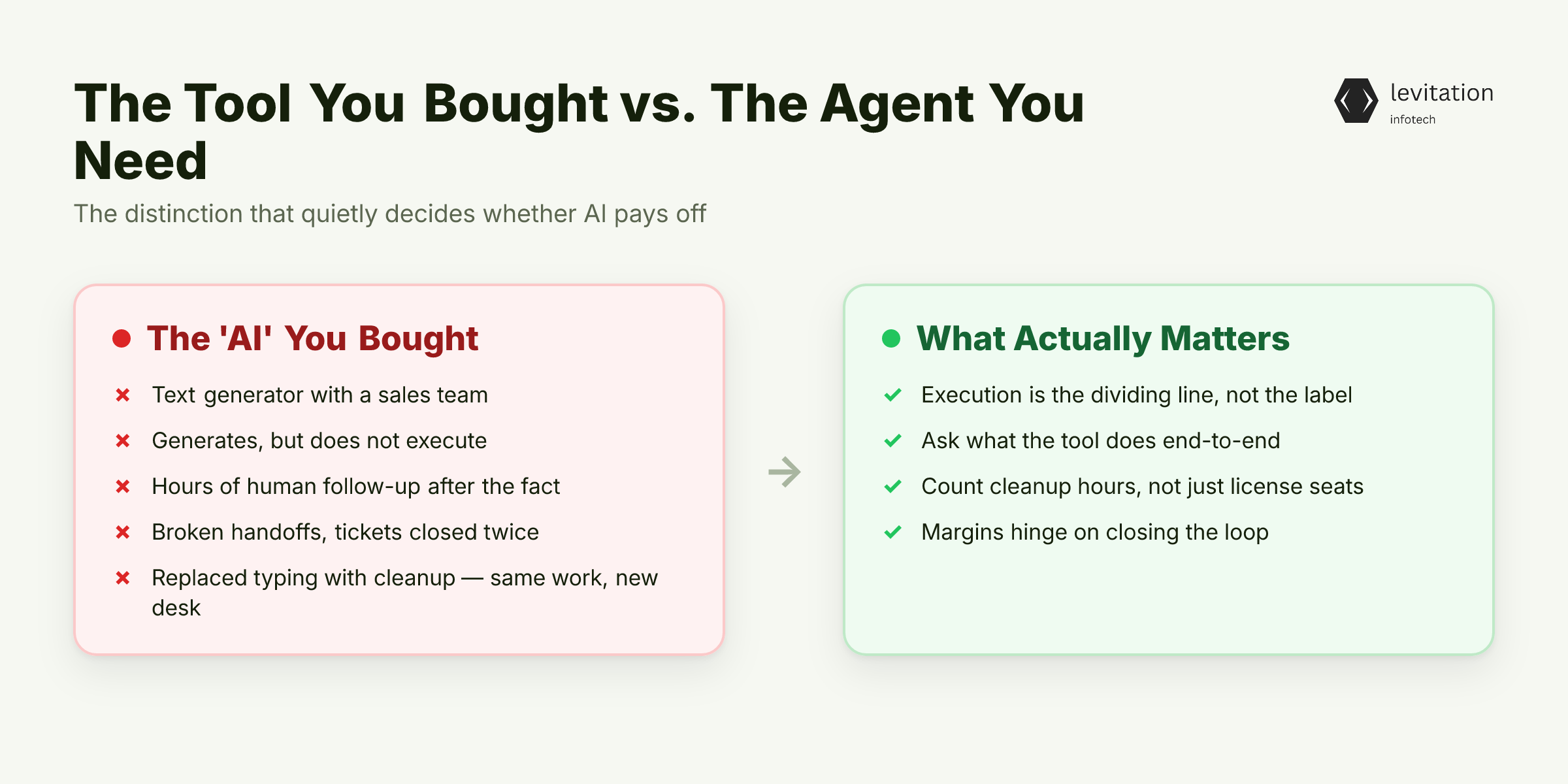
You probably bought one last year. It was probably called an "AI assistant" or a "smart chatbot." And it almost certainly isn't an AI agent. It is a text generator with a sales team.
The label "AI assistant" has stretched to cover almost anything that produces language. A search bar with autocomplete. A help-desk widget that rewrites your question. A Slack bot that drafts a reply and stops there.
None of these are agents. They generate. They do not execute.
The business cost of that confusion is quiet but heavy. Hours of human follow-up because the "AI" never updated the CRM. Broken handoffs because the bot didn't actually read the order history. Tickets closed twice because nothing in the stack agreed on the state.
None of it shows up in the vendor's case study.
The pitch was always the same: reduce headcount on repetitive work. The reality is that you replaced one form of repetition (human typing) with another (human cleanup). The repetitive work didn't move. It just changed desks.
But if those tools aren't agents, then what is? And why does the distinction matter for your margins?
The Five-Step Loop That Separates Agents From Chatbots
An AI agent is an autonomous software program that uses AI to pursue a goal and complete tasks on your behalf. The phrase sounds abstract until you name the five steps every agent runs, in a loop, until the job is done.
- Read the current state. Pull what's relevant from a database, an inbox, a CRM record, or a document.
- Pick the next action. Decide which tool to call, or stop because the goal is met.
- Call the tool. Hit an API, run a query, send an email, update a record.
- Observe the result. Parse the response, capture errors, log the outcome.
- Decide whether to continue. Either loop back to step one with new state, or finish.
The model is the brain. The tools are the hands. The loop is the workflow. The moment the system calls a tool, it stops talking and starts doing.
That is the line a chatbot never crosses.
A simple version looks like this in pseudocode, which is how most production agents from the top generative AI companies in India actually get scaffolded:
1while not goal_reached(state):2 action = llm.decide_next_action(state, available_tools)3 result = tool_registry.execute(action)4 state = state.update(result)5 log(action, result, state)
The pattern is deceptively plain. The hard parts hide inside the choices. Which tools the agent can touch. What it sees. What it must never see. Who reviews the edge cases. How it fails at 2 a.m. when an API returns a 500.
That loop is elegant on paper. It only matters if you can see how it behaves differently from the tools already sitting in your stack.
AI Agent vs. Chatbot vs. RPA: Why the Labels Mislead You
Three categories get called "AI" today. They behave very differently. - Chatbot. Answers from a script or a knowledge base. Hands off to a human when stuck. Never changes a record anywhere. The model is the product. - RPA (robotic process automation). Follows rigid, pre-written rules. Clicks buttons, moves files, copies fields between screens. Breaks the moment a layout shifts, because it has no judgment. The script is the product. - [AI agent](/ai-agents). Reads the goal, picks its own tools, adapts when something unexpected happens. Calls APIs, not screens. Can hand work to another agent, then keep going. The loop is the product.
Think of autonomy as a dial, not a switch. On the left, a simple LLM router picks one of three canned replies. In the middle, an agent with a handful of tools runs a few-step loop.
On the right, a system owns its own control flow across minutes or hours. It coordinates with other agents. It recovers from failures. It only asks a human when it hits a true exception.
The further right you go, the more your engineering team has to think about observability, permissions, and safe execution. An agent that can send email on your behalf needs guardrails around what it can send, to whom, with what data attached. A chatbot that only replies inside a chat window does not.
This is also where most vendors blur the line. They will call a retrieval-augmented chatbot an "AI agent" because it can look up a policy doc. It cannot write back to the system.
That is the tell.
If you want a deeper breakdown of the labeling problem in the Indian market, this piece on chatbot quotes is a useful complement.
Once the mechanism is clear, the practical question takes over: what can this thing actually do inside a real business, starting Monday morning?
Where AI Agents Are Pulling Weight in Real Businesses
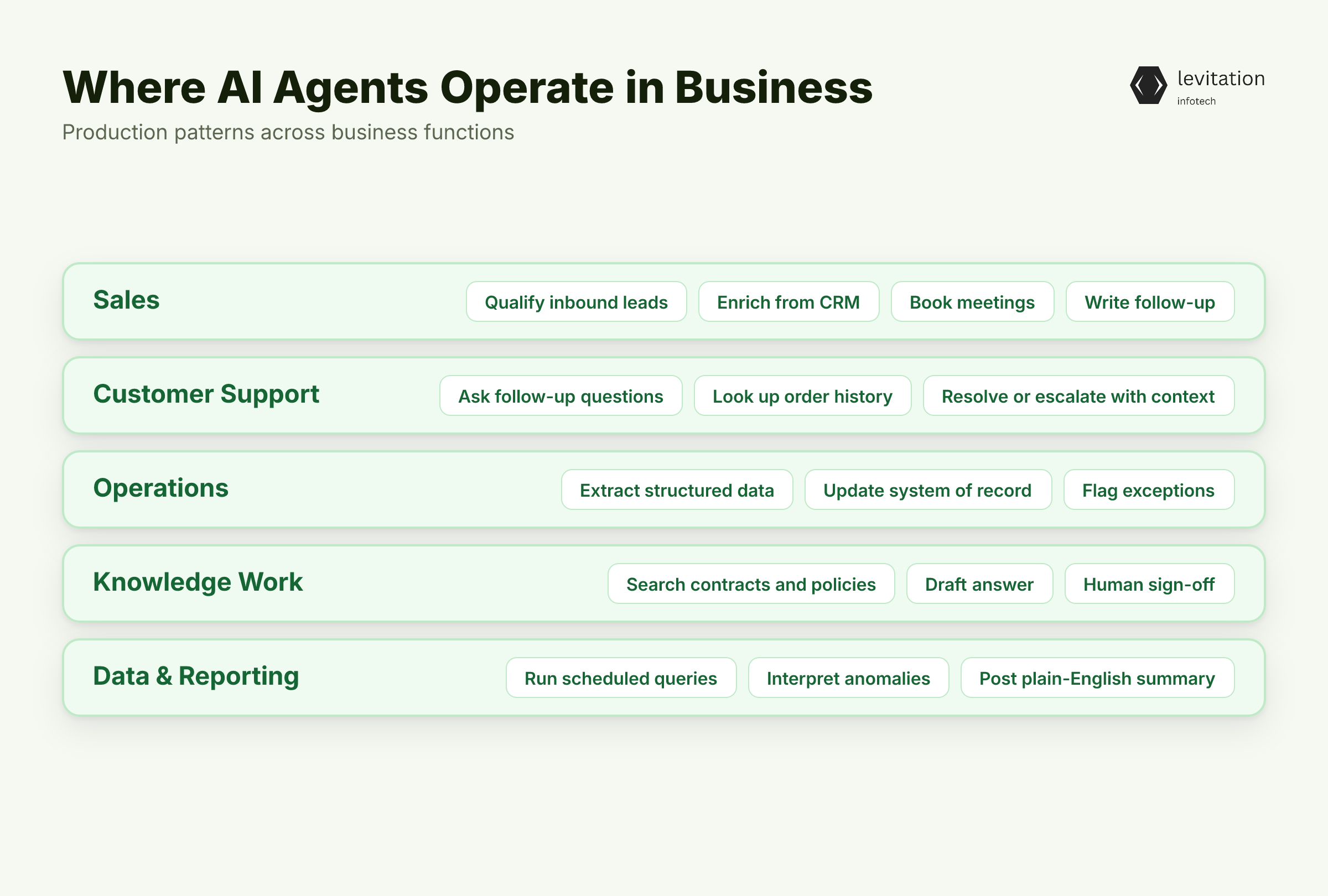
Agents are not theoretical. They are running in production, often quietly, across functions you already have. A few patterns show up again and again in deployments from the top generative AI companies in India: - Sales. An AI agent that qualifies inbound leads, enriches them from your CRM, books meetings on the rep's calendar, and writes the follow-up. No human touches the thread until the meeting is on the books. - Customer support. A contact center agent that asks the right follow-up questions, looks up order history, and either resolves the ticket or escalates with a full summary attached. The human inherits context, not a blank form. - Operations. An agent that watches an inbox or a shared drive, extracts structured data, updates the system of record, and flags exceptions for a human reviewer. Think invoice triage, vendor onboarding, KYC document checks. - Knowledge work. An agent that searches across contracts, policies, and past tickets to draft an answer a human signs off on. The human reviews, the agent does the reading. - Data and reporting. An agent that runs scheduled SQL queries, interprets anomalies, and posts a plain-English summary to a Slack channel. The dashboard updates itself. - Voice. An agent that handles inbound calls, authenticates the caller, and either solves the request or routes it with context. Same loop as the chat agent, just with speech on the front end.
The pattern is consistent. The agent absorbs the checklist-driven slice of a workflow. The human keeps the judgment slice.
That is where the margin moves.
The bar is not the demo. It is the second renewal.
Those examples sound promising in a slide deck. They raise a harder question: what does it actually take to put one into production, and what does it cost?
What an AI Agent Project Actually Costs and When You're Ready
A focused first agent, scoped with a specialist, usually deploys faster than an in-house team building from scratch. The patterns, integrations, and guardrails are already in the partner's head.
An in-house team carries the same engineering load from zero. They also carry the overhead of standing up infrastructure for the first time.
The first agent is the most expensive one. After that, the second and third ship faster. The agent framework, the tool integrations, the guardrails, and the eval harness already exist.
Teams that treat agent one as a platform investment, not a one-off project, compound that advantage. Mature agent programs survive their first year precisely because they plan for agent two and three on day one.
A short readiness checklist beats any vendor pitch: - A workflow with clear inputs and outputs, not a vague "use AI somewhere." - A system of record the agent can read and write to, with proper auth. - A tolerance for human-in-the-loop review on edge cases, especially early on. - A measurable outcome you are trying to move: cycle time, deflection rate, conversion.
A simple heuristic: if a person follows a checklist today, an agent can absorb most of the mechanical steps. The rest is judgment, which is exactly where you keep a human in the loop.
If that readiness check passes, the question shifts from "should we?" to "what does life look like three years after launch?"
What Changes When an Agent Runs in Production for Years
The boring outcome nobody markets: a workflow that used to need three people now needs one. That one person stops doing data entry and starts doing the work only they can do.
Customer conversations. Edge cases. Exceptions. The kind of work that moves revenue.
The longer an agent runs, the more edge cases it has seen, the better its prompts and guardrails get, the more workflows it can absorb. This is the compounding effect that justifies the platform framing.
Year-one value is the deployment. Year-three value is everything the agent has learned since.
Longevity is the real proof of quality. A system still running long after deployment tells you more than any demo ever will. It means the agent kept earning its keep long after the launch announcement.
The build-versus-buy math has shifted over the last two years. Most organizations are not asking whether to build the agent framework anymore. They are asking which specialist to bet on for the next decade.
That is the difference between a tool you renew and a system you build the rest of the workflow around.
Frequently Asked Questions
What is the difference between an AI agent and a chatbot?
A chatbot answers questions using a script or a language model. Then it hands off to a human when it hits something it cannot handle.
An AI agent goes further. It picks its own tools. It takes actions inside your systems, such as updating a CRM, sending an email, or querying a database. It observes the result. Then it decides its next step without waiting for a human prompt.
What is the difference between an AI agent and agentic AI?
The terms are often used interchangeably. "Agentic AI" is the broader category of AI systems designed to act autonomously. An "AI agent" is one specific instance: a single autonomous program built to handle a defined workflow, usually with tool access.
How much does it cost to build an AI agent for a small business?
A focused first agent, say lead qualification or support triage, is the most expensive one you will build. It carries the cost of standing up the framework, integrations, guardrails, and eval harness from scratch.
Costs rise with the number of tools the agent touches, the regulatory environment, and how much human-in-the-loop review you want.
Do AI agents replace employees?
In practice, they replace tasks, not roles. An agent absorbs the mechanical slice of a workflow: the data entry, the lookups, the follow-up emails, the status updates.
Your people stop doing that. They spend more time on judgment, exceptions, and customer relationships, which is where the margin lives.
How do I know if my business is ready for an AI agent?
You are ready if you can point to a workflow where a person follows a repeatable checklist today. The inputs and outputs must be digital and accessible. You need a clear success metric. And you can tolerate a human reviewing edge cases during the first few months.
If any of those four is missing, fix that first. The agent will fail downstream of it.
About the author
Mayank Singh is a software developer at Levitation Infotech, where he builds web and AI-powered applications across the company’s fintech, healthcare, and enterprise projects.