

It's 11:47 AM. Your floor supervisors are WhatsApping each other inventory counts that should be inside the ERP. The system cost ₹8 lakh. The workflow automation it promised is now a parallel spreadsheet. This is not a training problem. It is a design problem.
TL;DR: ERP adoption fails because workflows are built around the clean happy path, not the messy exceptions that consume 80% of supervisor time. Adding more rules makes the bypass worse, not better. The fix is a 90-day rebuild scoped to one high-value process, designed around the exceptions first and the ideal flow second.
Key Takeaways: - Fewer than 10% of ERP workflows actually flow through the system after go-live. The rest stay in WhatsApp and Excel because the rules cannot model real exceptions. - The ₹8 lakh sticker is not the real cost. Adoption failure is. A rebuild the team actually uses is cheaper than a fresh deployment that gets ignored by lunch. - A focused 90-day rebuild around one exception-heavy workflow is the fastest path to a system people keep open past noon.
The ₹8 Lakh System That Nobody Opens After Mid-Morning
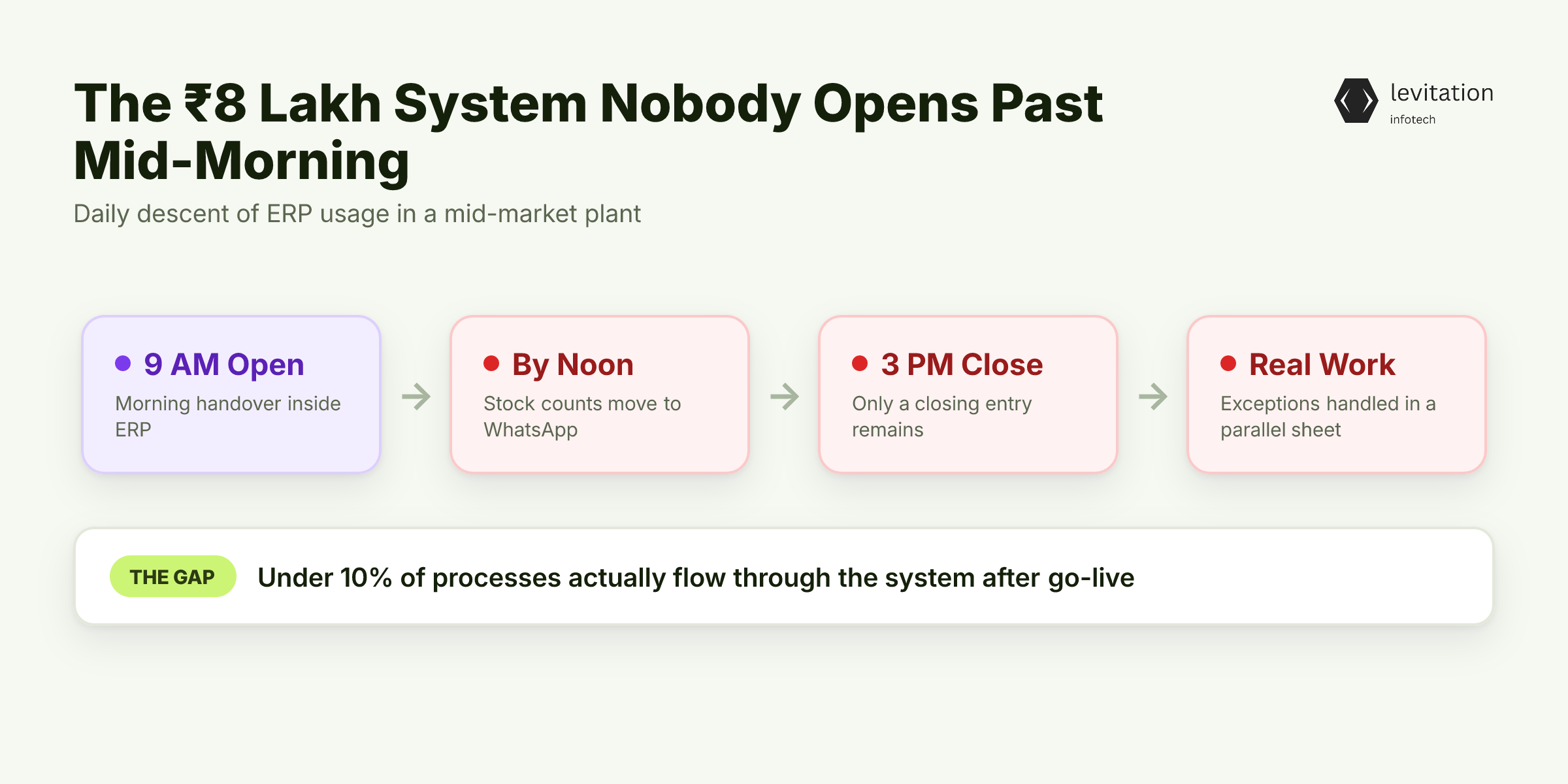
The daily pattern is the same across most mid-market plants. The ERP opens at 9 AM for the morning handover. By noon, the same supervisor is back on WhatsApp groups, sharing stock counts as voice notes. By 3 PM, the only thing inside the ERP is a closing entry. The actual work, the exception handling, the partial receipts, the credit notes, lives in a parallel spreadsheet someone built six months ago and never deleted.
This is not a story of an edge-case failure. The research on IT workflow automation is blunt: most projects leave fewer than 10% of processes actually flowing through the system after go-live. The rest stay manual because the system cannot model the work. The promised automation delivers fragmented workflows and minimal impact instead.
Here is the symptom nobody reports upward. The system is technically live. The dashboards render. The reports generate on schedule. The CFO sees a green light on the project scorecard. But the operations team has quietly routed the real work around the tool. The ERP is not broken. It is just not where the work happens. You can see this exact pattern on the shop floor in Why Plant Managers Log Line Stops in WhatsApp, Not ERP, where the floor's version of "minimal impact" is a parallel system running on phone memory.
This is the most common outcome of a typical ERP implementation cost in India deployment. It is not an edge case. It is the median result.
The instinct is to blame the operations team for resisting change. But the real problem is buried in how those workflows were wired together in the first place.
Why "Just Configure More Rules" Makes the Adoption Problem Worse
When the bypass shows up in a steering meeting, the response is predictable. Add more rules. Tighten validation. Configure one more approval gate. The IT team goes back to the workflow designer and starts layering if/then logic to force the supervisor back into the system.
This is the wrong move, and the research tells us why. Most IT teams end up automating less than 10% of workflows even after go-live, not from lack of skill but because the remaining 90% cannot be reduced to deterministic rules. They are exception-heavy, context-dependent, and shift with every supplier or customer change.
Rules-based automation is brittle. Change one business condition, like a new tax slab, a new supplier, or a partial delivery, and someone has to rewrite the rule, re-test the branch, and re-train the approver. Every new rule carries ongoing testing, monitoring, and update overhead. The hidden operational tax quietly kills ROI. The research puts it plainly: failed IT automation often creates more problems than it solves, with teams spending more time managing broken systems than they would on manual processes. Add a rule, and you have just expanded the surface area for the next failure.
Think of ERP development as a system of rules layered on top of each other. Each layer looks small in isolation. Together, they form a tower of exceptions that nobody fully understands and nobody can safely change. The supervisor who skipped the system is not lazy. They are correct that the system cannot handle the case in front of them. This is the same adoption ceiling described in Why 60% of Indian ERP Implementations Fail at Adoption, where the system itself is the constraint, not the user.
If piling on rules makes the system worse, then the bypass is not laziness on the floor. It is the only rational response to a system that cannot handle the actual work.
The Real Reason Your Team Quietly Walks Away From the ERP
The mechanism is consistent across deployments. The original implementation was designed around the happy path: the clean PO, the perfect receipt, the invoice that matches the GRN line-for-line. The 20% of cases that consume 80% of supervisor time were either ignored or pushed to a "phase two" that never came.
The moment real work shows up, the system stalls. An invoice arrives with a credit note attached. A shipment is short by six units. A customer wants a return against a closed PO. The ERP has no clean branch for any of these. The supervisor has three options: spend 20 minutes fighting the workflow, raise a ticket to IT, or default to email. They default to email. Every single time.
This is where the operational damage compounds. Disconnected tools and outdated workflows are not bugs in the implementation. They are the rational user response to a system that cannot model the business as it actually runs. Every bypass adds a row to the shadow spreadsheet. Every shadow spreadsheet is a future audit risk. The cost of ERP implementation cost in India was never just the licence. It was the operational debt created by the bypass itself.
The most damaging part is what does not get reported upward. Supervisors do not say the system is broken. They say they are managing. Managers do not escalate because the dashboard still shows the system is live. The bypass hides inside the gap between what the system says and what the work actually is.
Once you accept that the bypass is design feedback, the question becomes: what does a workflow look like that an operations head would actually keep open all day?
What a Workflow That Sticks Actually Looks Like
Rule-based automation works on a fixed condition and a fixed action. Exception-aware automation does something different. It can classify unstructured inputs, such as a scanned PO, an email approval, or a handwritten gate pass, and route the case into the right branch without a human deciding which branch to pick first.
The difference matters more than it sounds. A rule-based PO workflow can handle the clean cases that fit the deterministic path and stalls on everything else. An exception-aware workflow treats the messy cases as the design centre and makes the clean case a side effect. The 80/20 inverts.
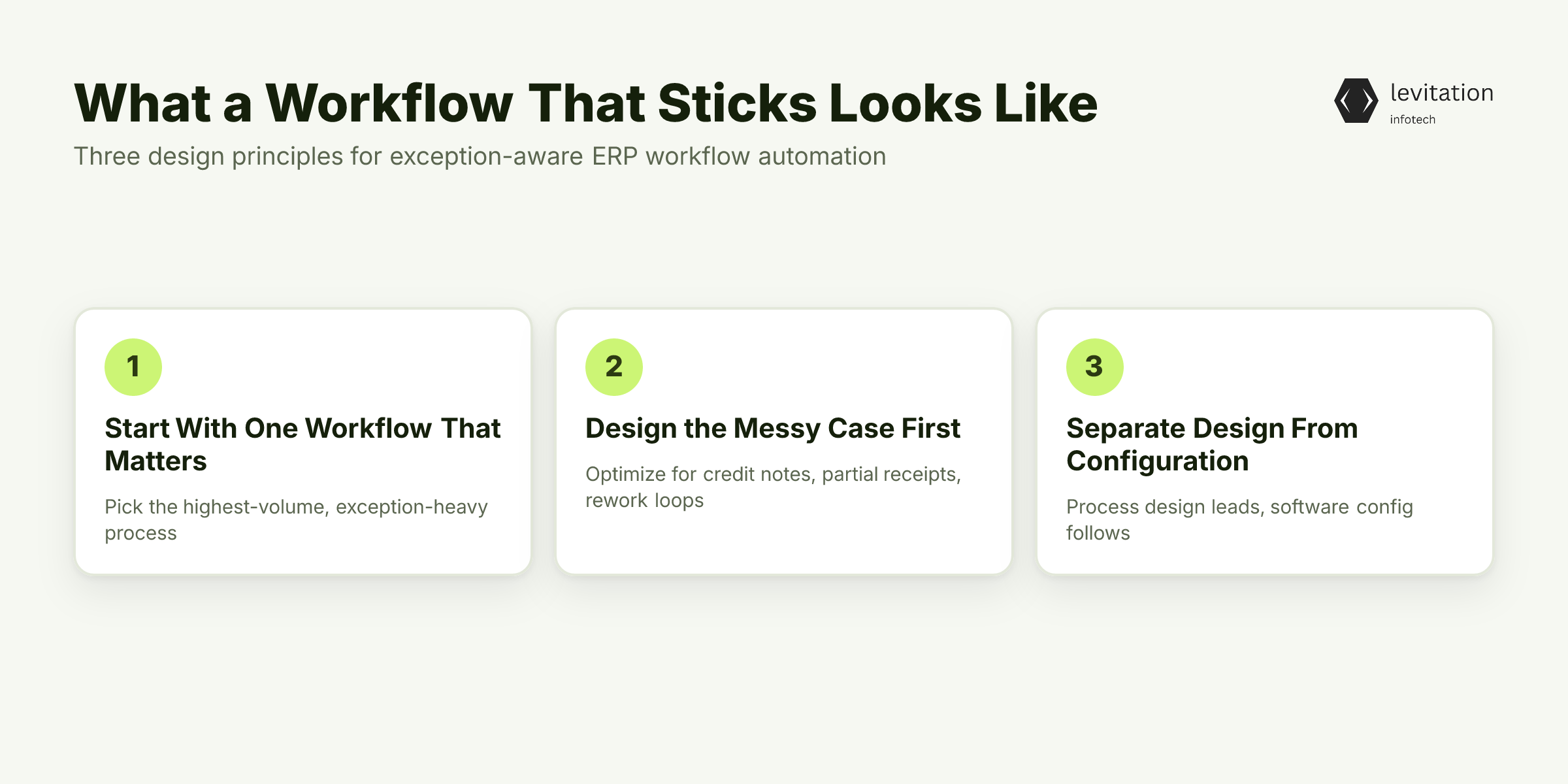
The first design principle is start with one workflow that matters. Pick the highest-volume, exception-heavy process. Usually that is goods receipt, vendor invoice approval, or shop-floor issue logging. Do not pick the most visible workflow. Pick the one the supervisor cannot avoid.
The second principle is design the messy case first. Optimise for the credit note, the partial receipt, the rework loop. If the system handles those gracefully, the clean 80% is free.
The third principle is the one most teams miss: software configuration and process design are separate disciplines. A custom ERP for SMEs project that treats process design as a sub-task of configuration is already on the path to a parallel spreadsheet. The design has to come first, then the configuration follows it.
A focused rebuild like this typically lands in 3-6 months with a team that has done it before. In-house teams without that context routinely run far longer on the same scope. The gap is not effort. It is muscle memory on the exception cases.
Knowing what a stickable workflow looks like is the easy half. Building it inside a realistic 90-day window is where most in-house teams stall.
The 90-Day Rebuild Sequence That Puts the ERP Back in Use
A rebuild that produces a workflow people actually use fits in 12 weeks. Here is the sequence. - Weeks 1-2: Shadow, do not interview. Sit with two supervisors for a full shift. Log every exception the current system cannot handle. The interview-based requirements document misses most of what the floor actually does. The shadow log becomes the real spec. - Weeks 3-6: Redesign around the exceptions. Take the highest-volume workflow and rebuild it end-to-end, starting with the credit notes, partial receipts, and rework loops that broke the previous design. The clean path is engineered last. - Weeks 7-10: Build the flexibility into the [ERP system](/erp-development). Configurable approval matrices, not hard-coded role hierarchies. Document parsing for unstructured inputs, including scanned POs, email approvals, and supplier-issued PDFs. The system should accept a messy input and route it correctly, not punish the user for submitting one. - Weeks 11-12: Train on the hard cases. Run the team through the three hardest scenarios. If they can close credit notes, partial GRNs, and rework loops inside the ERP, the easy 80% will follow without effort.
The ERP implementation cost in India conversation changes shape after a rebuild like this. The number is no longer the licence on a sticker. It is the scope of the rebuild: how many workflows, how many exception types, how many users. That framing aligns vendor incentives with adoption instead of against it.
A rebuild that lands well does more than repair faith in the system. It changes what the operations team can do with the other six hours of the day.
What Changes When the System Finally Stays Open All Day
The visible win is the small one. Supervisors stop running parallel spreadsheets. Tickets close inside the ERP before lunch instead of after. The morning handover becomes a live query instead of a verbal recap.
The compounding win is the bigger one. The exception data captured inside the system, including the credit notes, the partial receipts, and the rework reasons, becomes the input for the next round of automation. That is the difference between a one-time config and a real improvement loop. Each quarter, the system gets smarter about the cases the previous quarter surfaced.
The credibility win shows up the next time a procurement conversation starts. When the ERP implementation cost in India conversation opens with "the last one got used," buying the next one is a procurement decision, not a leap of faith. That is exactly how Most Indian Manufacturers Buy ERP Twice, where the second buy is usually the rebuild, not a new licence.
The macro signal is the one that matters. Usage is the only metric that survives a year-two review. Everything else is theatre.
Frequently Asked Questions
Q: Why do operations teams bypass ERP systems even after training?
A: Bypassing is almost always a design response, not a behaviour problem. If the workflow cannot handle the 20% of cases that drive 80% of supervisor time, including credit notes, partial receipts, and rework loops, the rational move is to default to email, WhatsApp, or Excel. The system is signalling its own limitation, not the team's resistance.
Q: How much does ERP implementation actually cost in India for an SME?
A: The licence is the smallest line item. The real ERP implementation cost in India is driven by process redesign, exception handling, data migration, and the multi-month effort required to get teams actually using the system. A deployment that nobody uses costs more in operational debt than a rebuild that the operations team keeps open all day.
Q: What is the realistic timeline for a custom ERP rebuild?
A: A focused rebuild of one high-value workflow typically runs 90 days. A full custom ERP for SMEs deployment, scoped around real exceptions rather than ideal processes, usually lands in 3-6 months. In-house teams without prior ERP context routinely run far longer on the same scope because they underestimate the exception-handling work.
Q: Is Odoo or ERPNext cheaper than SAP for workflow automation?
A: On licence, Odoo and ERPNext are dramatically cheaper than SAP. The Odoo implementation cost conversation usually lands well below a SAP project of equivalent scope, with faster customisation cycles. The trade-off is integration depth for highly regulated or multi-entity SAP-grade operations, which is a separate architectural decision, not a cost one.
Q: How do you know if your ERP workflow automation is actually working?
A: Login frequency and transaction volume by role are the only honest signals. If your floor supervisors log in once a day to check status but route actual work through WhatsApp, the automation is not working. Track where work is actually being recorded, not where it is supposed to be recorded.
About the author
Mayank Singh is a software developer at Levitation Infotech, where he builds web and AI-powered applications across the company’s fintech, healthcare, and enterprise projects.