


TL;DR: Manufacturing savings do not begin when ERP modules go live. They begin when ERP, warehouse, and shop floor agree on one available-to-promise position. Every movement behind that number must also be traceable.
Key Takeaways: - A stock agreement must fix item, location, lot, unit, and available quantity at one cutoff. - Reliable movement posting and a visible exception queue matter more than another dashboard. - Four staged waves and daily reconciliation turn stock agreement into an operating control.
Where the Margin Leak Starts: Two Truths About Stock
A plant can run a modern ERP and produce polished reports. Its warehouse team still cannot promise whether raw material is available. The expensive problem is not simply bad data. Two versions of available stock drive purchasing, production, and financial reconciliation at once.
The false-accuracy trap
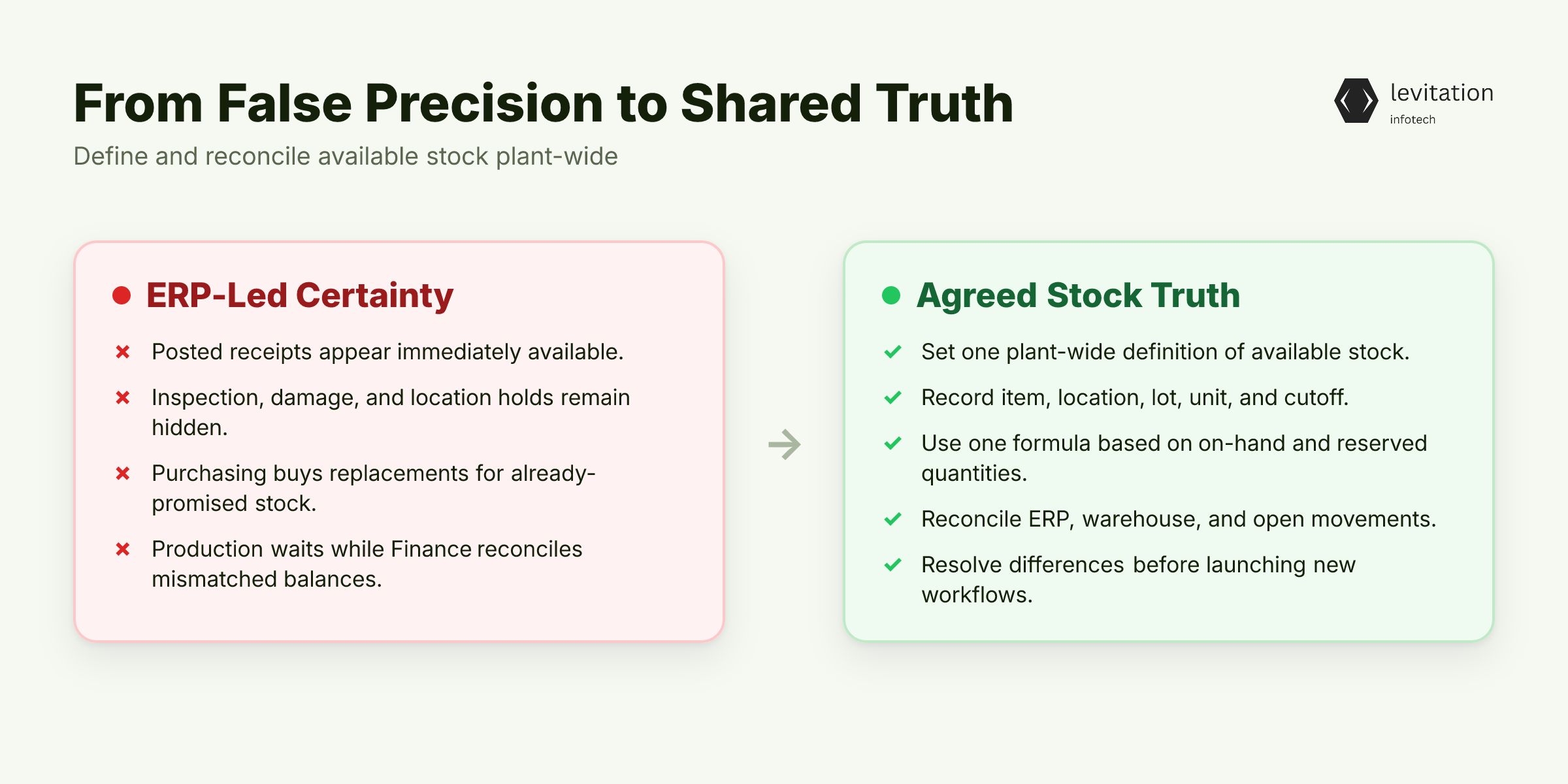
ERP can show a batch as available because its receipt was posted. The same batch can be awaiting inspection, on damage hold, or at an unconfirmed location. If the warehouse cannot locate or release it, the ERP number is precise but operationally false.
That false certainty reaches every downstream decision. Procurement buys replacements for stock the plant has already promised. Production releases work orders, then waits for material, while Finance reconciles against a balance the plant cannot supply.
The symptoms include procurement delays, scheduling conflicts, stockouts, excess inventory, and capital trapped in work-in-process. These are not separate software problems. They share one cause: the plant has failed to define what available means.
A plant-wide stock agreement defines each dimension at one cutoff: - Item - Plant or warehouse - Batch or lot - Unit of measure - On-hand quantity - Reserved quantity - Available quantity
Available quantity then follows one plant-wide formula, not whichever balance updated last. Before changing any system, run a baseline comparison: - ERP on-hand and ERP available balances - Warehouse-recorded balances - Open receipts, issues, transfers, and production consumption
Compare both sides by item, location, lot, and unit at the same cutoff. Resolve or document each difference before setting up another workflow.
Another dashboard won't settle this. ERP software development can connect records, but it cannot decide which truth the plant will use. Factory complexity, not headcount, drives ERP cost.
Finding the mismatch is only half the job. The harder failure starts when teams patch it with spreadsheets, phone calls, and manual overrides.
Why a Clean ERP Dashboard Can Still Mislead the Plant
A plant can buy production, MRP, quality, procurement, and accounting modules and still lose sight of a single receipt. Buying by module asks what software is installed. Buying by operation asks how stock becomes usable, reserved, moved, consumed, and released.
Factory events have states. A purchase order can be partly received, while a batch waits for quality release. Material can sit in transit between sites. Copying a balance erases those states. It leaves a neat number that is not promiseable.
The integration must preserve five distinctions: - Available versus reserved: stock can exist without being promiseable. - Multiple units: pieces, kilograms, and cases must convert to a common base without changing the underlying quantity. - Identity: item codes and warehouse codes must mean the same thing everywhere. - Location: in-transit and in-process stock need distinct states. - Quality: received, inspected, blocked, and released stock cannot collapse into one balance.
Two integration mistakes are especially dangerous: - Repeated movement imports create a second receipt when the first message actually succeeded. - Master-data updates can overwrite a newer warehouse balance with an older ERP value.
Retries and updates feel harmless until both paths change the same quantity.
Before choosing an integration method, draw the complete movement path: - Receipt to inspection, release, and issue - Warehouse transfer to plant consumption - Production completion to finished-goods availability - Return, rejection, and stock adjustment
The drawing exposes missing states and ownership gaps. The plant needs an explicit stock contract before adding another system, especially when evaluating custom ERP for manufacturing. That contract must answer a harder question: where does each fact belong?
Define One Available-to-Promise Contract
One Canonical Answer
ERP, warehouse, and shop-floor teams should work from the same available-to-promise position under one formula and one timestamp. Inbound stock counts only when plant policy allows it. A receipt alone does not count if inspection or location confirmation remains pending.
One formula doesn't mean one system owns every fact. ERP inventory integration must combine separate responsibilities without pretending they are identical. The formula is settled, but the sources still need owners.
Decide Where Truth Lives
Assign each system clear ownership of the facts it controls: - ERP owns commercial commitments, inventory valuation, and financial postings. - The warehouse system owns physical receipts, issues, transfers, locations, and lots. - The shop floor owns production consumption and completion events.
These assignments should change only when business logic requires it. In some plants, a quality system owns release status and posts eligible stock back to ERP.
Once ownership is set, each movement still needs a safe path into the ledger.
Define the Movement Envelope
Every stock event must survive retries, delayed posting, and audit review. It needs: - A unique movement identifier and state - Item, location, quantity, and unit of measure - Batch or lot, plus serial identity where required - Source, destination, and reason code - Source and posting timestamps
Without this envelope, a retry can create a duplicate stock issue. An old balance update can erase a newer receipt.
Make posting idempotent. The same movement identifier can be processed repeatedly. It must create only one stock effect and one financial posting. Idempotent posting protects the plant from ambiguous retries without blocking legitimate corrections.
Every mismatch also needs a visible path. Route unmatched receipts, negative available balances, stale warehouse records, and blocked inventory into a reconciliation queue with an owner. Manual adjustment closes an exception; it does not replace the queue.
Use one non-negotiable rule. No purchase commitment, production release, or fulfillment promise can rely on a quantity the agreed report cannot confirm.
With the contract set, the rollout must expose what the plant's records actually say before it risks an all-at-once ERP launch.
Implement in Four Waves, Not One Risky Cutover
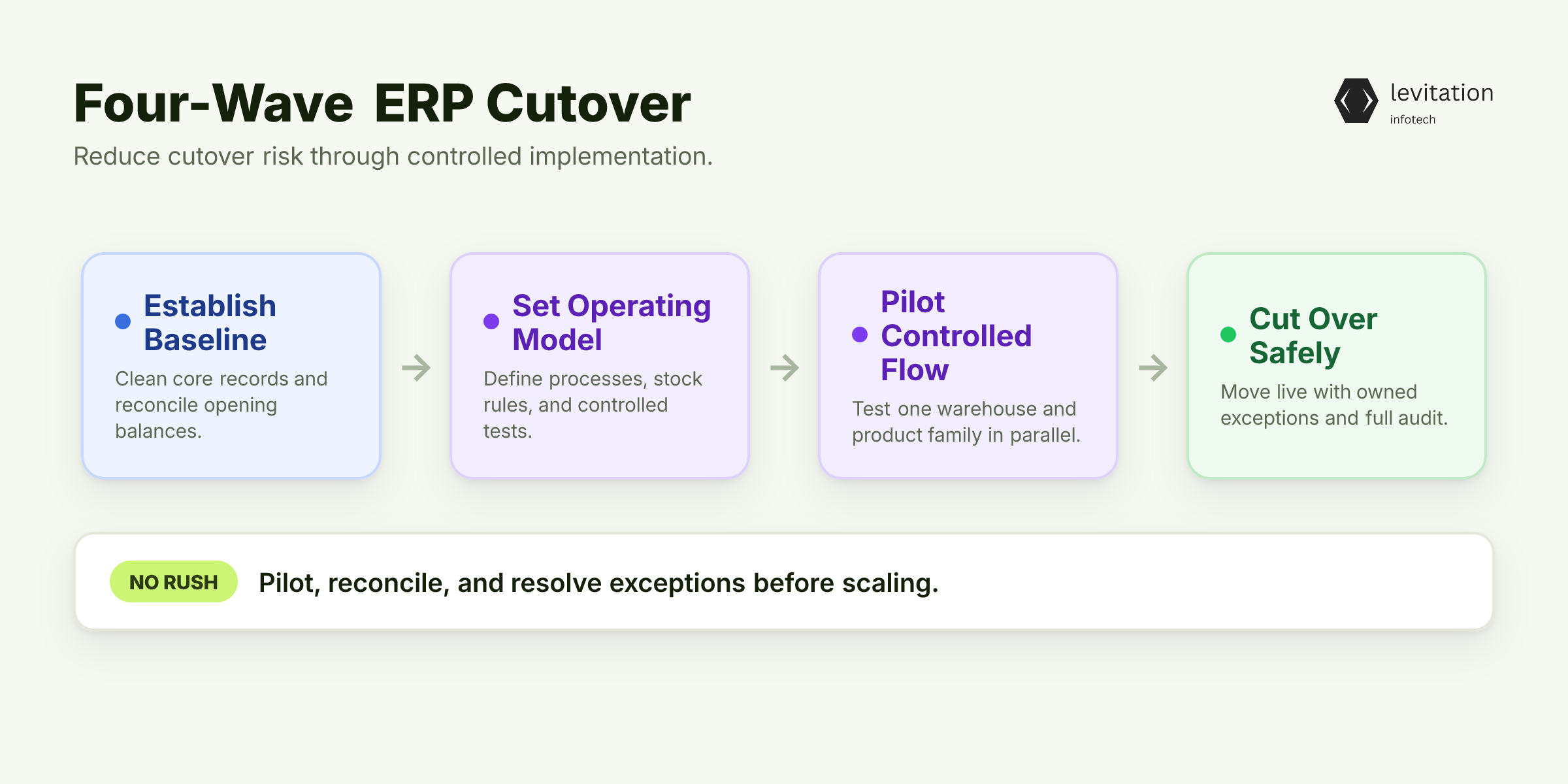
Wave 1: Establish the Baseline
Clean the records before setting up workflows that depend on them: - Item master, locations, units of measure - Bills of materials and warehouse mappings - Opening stock and all open movements
Resolve or document discrepancies before starting new transaction flows. A clean cutover cannot repair bad foundations; the baseline reveals which operating rules need rebuilding.
Wave 2: Set the Operating Model
Map each standard process and define how it enters ERP: - Purchase, receipt, and supplier return - Warehouse transfer and in-transit movement - Production issue, consumption, and completion - Quality release, adjustment, and finished-goods receipt
Set rules for when inbound stock counts toward availability. Define which events change on-hand, reserved, or available quantities. Those rules need a controlled test before they touch the whole plant.
Wave 3: Pilot One Controlled Flow
Choose one warehouse and one product family for the pilot. Run ERP and warehouse processing in parallel. Reconcile every movement before comparing planning outcomes.
Include partial receipts, backorders, batch issues, transfers, returns, and production consumption. Parallel processing exposes integration defects before they become plant-wide habits. It also tests the warning that packaged ERP will never fit your plant floor.
The final test is harder: what happens when a movement fails during cutover?
Wave 4: Cut Over With an Exception Queue
Assign ownership for every unposted movement, duplicate record, failed interface, and stock adjustment. Retain audit evidence until each exception closes. No silent correction passes cutover.
For an Odoo implementation, set up standard manufacturing, purchasing, inventory, and accounting workflows before adding custom logic. Use custom development only where the plant's process cannot fit standard workflows.
For a custom ERP for manufacturing, validate multi-warehouse movement rules, traceability requirements, and existing interfaces. Customization doesn't remove integration work.
Include ERP software development, ERP implementation, deployment, and support in one delivery plan. Setup, interfaces, master data, testing, and daily use must be managed together. Effective ERP integration services treat them as one program.
Master-data readiness and integration scope still decide the schedule. Rollout speed protects savings only when daily controls stop records from drifting apart. Without those controls, a clean rollout starts losing truth. The harder test is whether that agreement survives daily operating pressure.
Make Stock Agreement a Daily Plant Control
Ownership Makes the Agreement Enforceable
Ownership is where agreement becomes enforceable. Without it, every mismatch becomes everybody's problem and nobody's task.
The warehouse confirms physical movements. The ERP team governs posting rules and master data. Procurement works from committed availability. Production planning works from the reconciled position.
Enterprise resource planning integration should connect those roles without hiding exceptions. The controls need a daily focus, or exceptions will wait for someone to notice them.
Review Exceptions, Not Every Transaction
Run a daily exception review covering: - Unposted movements - Negative available stock - Blocked batches - Long-pending transfers - Unit-of-measure mismatches - Purchase quantities without confirmed receipts
Track five measures: stock discrepancy rate, age of unposted movements, reservation coverage, slow-moving stock, and exception age. Agree thresholds with plant leadership. Generic benchmarks won't reflect the plant's process risk or service commitments.
Reconcile procurement receipts and production consumption in the same control cycle. Otherwise, discrepancies flow into GST reconciliation backlogs, costing errors, and poor WIP visibility.
Restrict manual stock edits. Require a reason code, approval, and an audit trail showing who changed a quantity and why. Record whether ERP and warehouse accepted the correction.
Use WhatsApp only as a temporary channel. Daily control must move the answer back into the ERP operating model.
When these controls become routine, ERP stops being only a record of what happened. It becomes a dependable system for deciding what happens next.
What Changes When ERP and Stock Agree
The payoff arrives in sequence. First, fewer stockouts and emergency purchases. Then less capital trapped in WIP, less excess inventory, and fewer production conflicts. Finally, less time spent clearing GST reconciliation backlogs.
Each gain follows from one mechanism. Confirmed availability stops planners from releasing impossible work. Better movement discipline keeps costing and WIP records current.
Yet a failed interface message can undermine the whole chain. If retrying it can create a second receipt, the stock agreement is still theoretical.
The decision payoff is equally practical: - Procurement sees reliable availability. - Planners release work against confirmed material. - Finance traces each inventory movement. - Warehouse teams spend less time proving stock exists.
Those gains remain theoretical until a vendor proves them in live transaction flows.
Buy an Operating Agreement, Not a Module List
Evaluate ERP for manufacturing India with one test. Ask each vendor to demonstrate five flows: receipt, batch issue, inter-warehouse transfer, reservation, and failed interface reconciliation. A module list cannot prove any of them.
Frame ERP selection as an operating agreement, not a software catalogue.
Before judging any system's inventory value, test it against one disputed material. Ask the vendor to reconcile the receipt, reservation, issue, and batch trail end to end. If that flow fails, the dashboard is still fiction.
The real test is what breaks when the vendor handles the plant's own disputed material.
Frequently Asked Questions
Which ERP is best for manufacturing companies in India?
No single ERP is best for every plant. Compare SAP, Oracle, Odoo, ERPNext, and Indian manufacturing ERPs against required MRP, multi-warehouse, quality, and GST accounting workflows. Also test ERP inventory integration, then validate the fit in a pilot.
Is Odoo suitable for manufacturing ERP in India?
Yes, when its manufacturing, purchasing, inventory, and accounting workflows are configured around the plant and connected to warehouse movements. An Odoo implementation should be judged by reconciled stock and production transactions, not by the number of installed apps.
How long does a manufacturing ERP implementation take?
The timeline depends on master-data readiness, integration scope, and the number of warehouses or product variants included in the rollout.
What does ERP inventory integration mean in a factory?
It is the controlled exchange of stock movements and balances between ERP and warehouse or shop-floor systems. The integration must preserve location, batch or lot, unit of measure, and reservation context, with a reconciliation process for exceptions.
Should a manufacturer choose configurable or custom ERP?
Use a configurable ERP when standard manufacturing and warehouse processes fit the business. Consider a custom ERP for manufacturing when unique production logic or integrations cannot be supported cleanly without creating excessive workarounds. Test either choice against one disputed material before signing.
About the author
Mayank Singh is a software developer at Levitation Infotech, where he builds web and AI-powered applications across the company’s fintech, healthcare, and enterprise projects.