


TL;DR: Zoho's pricing fits teams around 10 users. Salesforce's pricing fits teams past 200. The 30-80 user band falls into a gap where you're paying enterprise prices for tools you won't use, or outgrowing startup tools that can't scale. A custom CRM build often breaks even against a three-year Salesforce subscription, making "build" the third option that comparison sites ignore.
Key Takeaways: - The ₹18 Lakh figure is conservative. It only counts license costs, not the implementation, admin, and integration overhead that doubles the real bill. - At 50 users, a custom build in India can cost less than the first year of Salesforce Enterprise. You own the IP and lock in cost for 3-5 years. - The decision to stay on Zoho, move to Salesforce, or build custom depends on user count, workflow specificity, and whether compliance forces data ownership.
Your 10-User Zoho Bill Just Became a 200-User Salesforce Bill
Most Indian founders treat CRM pricing like a step function. Zoho for the startup phase. Salesforce when they "grow up." The math is supposed to be simple: pay more as you scale, upgrade tiers, move on.
The problem is that real teams don't scale in steps. They scale in messy increments. A 10-person Zoho setup doesn't jump to 200 Salesforce seats overnight. It grows to 30, then 45, then hits 50. And 50 is where both vendors' pricing logic breaks against your actual usage.
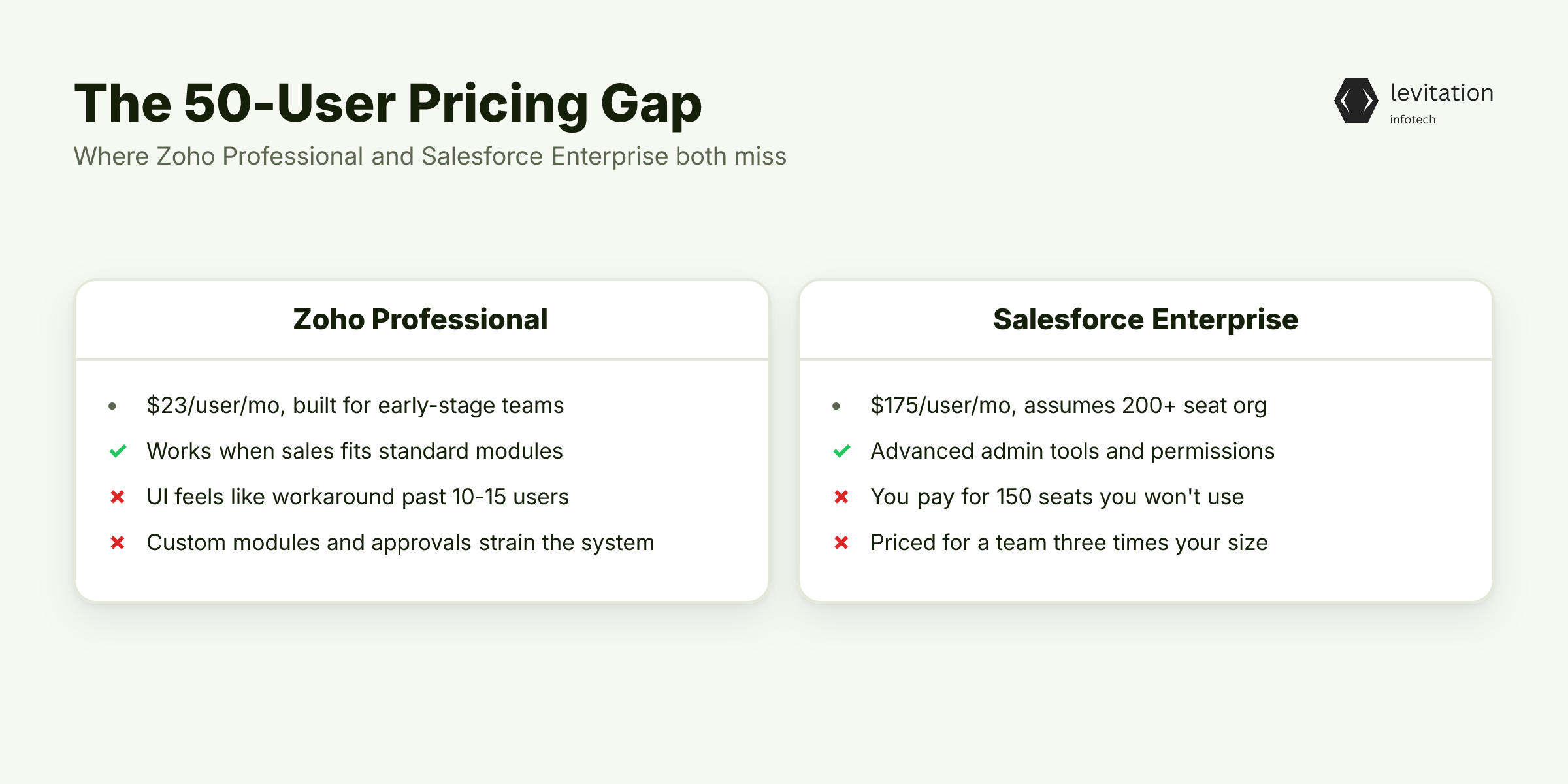
Zoho's Professional tier at $23 per user per month was built for early-stage teams. It works when your sales process fits standard modules and your reps accept Zoho's data model.
Past 10-15 users, the workflows get serious. Custom modules multiply. Approval chains get layered in. Zoho's UI starts feeling like a workaround for processes it wasn't designed to model.
Salesforce's Enterprise tier at $175 per user per month assumes a 200+ user sales org. It includes admin tooling, advanced permissions, and partner ecosystem depth that a 50-person team rarely touches.
Subscribing to Salesforce Enterprise for 50 users is paying for 150 seats of capacity and infrastructure you won't use. You're absorbing the cost of features designed for a team three times your size.
The 50-user growth stage is where your sales motion has matured past startup experimentation. It hasn't yet reached the scale that justifies enterprise tooling. Both vendors have priced their tiers around different user bands. You sit in the gap.
Before you blame the vendors, look at the real number. The ₹18 Lakh headline is actually an underestimate. If you're exploring options at this scale, Zoho CRM alternatives for growing teams is a useful starting point to understand what the market offers at the 50-user mark.
Why Upgrading Tiers Costs More Than the Sticker Price
The $175 per user per month Salesforce quotes is a starting point, not a ceiling. Einstein AI, advanced analytics, data storage overages, and premium support all add per-user costs.
At 50 seats, even small per-user add-ons compound into a second line item that can equal the base subscription.
Implementation is where the bill gets painful. For a 50-user Salesforce Enterprise deployment, the partner fee alone often equals or exceeds the first year of subscription, before a single rep logs in.
Most teams at this scale haven't budgeted for it. They expected the subscription to be the cost. They didn't budget the partner fee, the data migration, the training, or the six months of admin overhead while the system stabilises.
Zoho looks cheaper on paper, and its TCO stays close to its subscription price for basic usage. The trap appears when you need Zia AI (available only on the Enterprise tier at $40 per user per month) or multi-user portals. The moment you stack features, the per-user cost climbs back into the same range as mid-tier Salesforce.
You're not saving money. You're just paying for a different vendor's add-on stack.
The real expense isn't the license. It's the admin time, the integration debt, and the feature bloat you pay for but never use. We covered this pattern in our analysis of CRM budget sabotaging delivery, where the gap between quoted and actual cost was the dominant failure mode.
So if both off-the-shelf options bleed you dry, the obvious move is to keep Zoho and live with the limitations. That's the second trap. The break-even math that custom CRM development cost in India reveals surprises most founders.
The 50-User Option Most Comparison Sites Skip
At 50 users, a custom CRM built in India can cost less than a multi-year Salesforce subscription for the same headcount. The build lands at roughly the same as 12 months of Salesforce Enterprise at this user count.
The comparison sites won't tell you this. Their business model is affiliate revenue from SaaS signups. They have no incentive to surface "build" as a viable option.
The break-even math is straightforward. If you stay on Salesforce for three years, you've spent three times the cost of a custom build. You have zero IP ownership, ongoing subscription creep, and the annual renewal cycle.
A custom build locks in your cost. After the initial outlay, you pay hosting, maintenance, and incremental feature work. You don't pay per-seat licensing that doubles every time you hire.
Off-the-shelf comparisons (HubSpot, Pipedrive, Freshsales, Nutshell) solve feature gaps but not the underlying problem. They give you a different vendor's data model to fight against.
A 50-user team has already outgrown standard CRM patterns. Your sales motion is specific. Your integration needs are unique. Your reporting requirements don't map to a vendor's dashboard template.
Off-the-shelf always feels like a workaround at this scale. This is where custom CRM development becomes a commercial decision, not just a technical one. You're buying three years of subscription freedom in one build cycle.
The math is the same as leasing versus owning office space. The comparison changes once you run the numbers over a multi-year horizon. A build that survives year two, year three, and year five is what you're actually buying. CRM software development for 50-user teams requires a partner who'll be there for the full lifecycle, not just the launch.
The break-even math is clear. But what does ₹18 Lakh of custom build actually deliver versus a Salesforce subscription?
What ₹18 Lakh of Custom CRM Build Actually Buys You
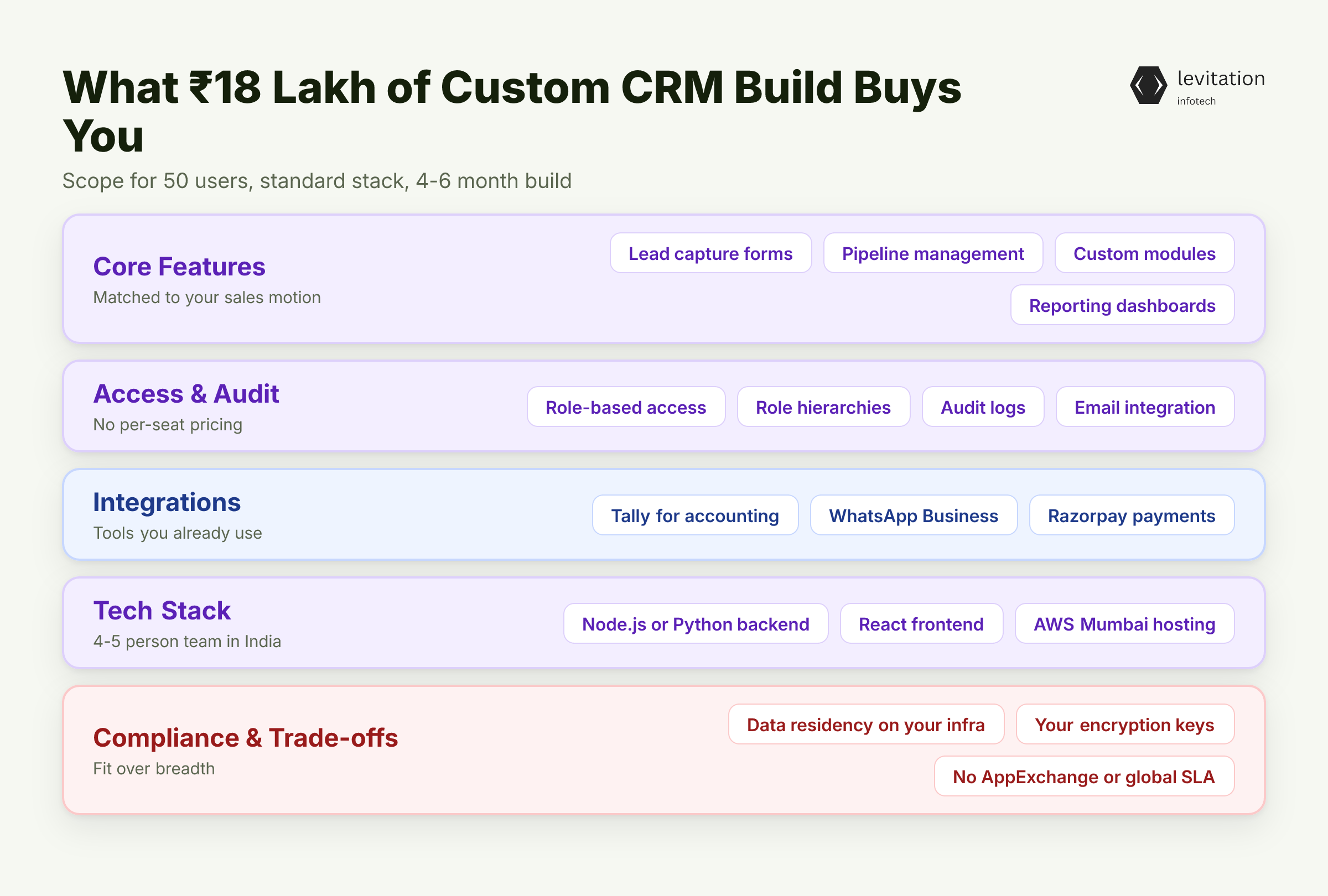
Scope for 50 users is well-defined. Lead capture forms, pipeline management with your stages, custom modules that match your actual sales motion, role-based access for sales reps, managers, and admins, reporting dashboards tied to your KPIs.
API integrations cover the tools you already use: Tally for accounting, WhatsApp Business for communication, Razorpay for payment status.
The tech stack is standard. A Node.js or Python backend with a React frontend, hosted on AWS Mumbai region, takes 4-6 months with a 4-5 person team in India. The variables that stretch timelines are custom AI features, mobile apps, and multi-tenant architecture. Skip them and the build stays in scope and on budget.
Feature parity with Salesforce is achievable. Workflow automation, mobile access, email integration, custom dashboards, audit logs, role hierarchies: all included, no per-seat pricing.
You get the same operational capability without the subscription tax. What you skip is the third-party marketplace, the AppExchange ecosystem, and the global support SLA. You trade breadth for fit.
For teams where compliance is non-negotiable, this trade-off matters more. Off-the-shelf CRMs sit on vendor infrastructure. A custom build sits on yours, which means your data residency, your encryption keys, and your audit trail are under your control.
The same architecture pattern that supports compliance in regulated industries applies to healthcare, pharma, finance, and insurance. Custom CRM system architecture and build process details how this works in practice.
The build cost is clear, but deciding whether to build, buy Salesforce, or stick with Zoho depends on variables the pricing pages don't show you. If you want a sense of how Indian vendors compare on real delivery, our review of same CRM build quotes varying from ₹6L to ₹40L shows what founders actually face when they solicit bids.
Stay on Zoho, Move to Salesforce, or Build: A Founder's Decision Tree
Stay on Zoho if you're under 25 users, your workflows fit Zoho's standard modules, and you don't need custom AI or deep ERP integration. This is the most common path for early-stage teams, and it works until it doesn't.
The signal that you've outgrown Zoho is when your sales team starts maintaining parallel spreadsheets to capture information Zoho's data model doesn't support.
Move to Salesforce if you're scaling past 150 users, you need a mature partner ecosystem, and you have budget for a dedicated admin. A full-time Salesforce admin in India carries a fully-loaded cost that can exceed the per-seat license savings versus a custom build.
That's a real line item that doesn't appear in the per-seat pricing. If you're under 100 users, the admin cost alone can dominate the total cost of ownership.
Build custom if you're stable at 30-80 users, your sales motion is specific enough that off-the-shelf always feels like a workaround, and you want three-year cost certainty. This is the path for teams who've already customised Zoho extensively and hit the ceiling.
It also fits teams who know their workflow won't map to a vendor's template. The 50-user ERP wall pattern applies similarly to CRM: past a certain scale, off-the-shelf stops paying off.
The hybrid option is the most common path for teams that don't want to disrupt active sales cycles. Stay on Zoho or HubSpot for 12-18 more months while scoping a custom build in parallel.
The old system runs production. The new system gets built, tested, and migrated to when ready. No revenue disruption. No emergency cutovers.
This pattern shows up in CRM migrations for Indian SMEs, where the staggered approach reduced risk.
Salesforce development and migration services cover the scenarios where you're already committed to Salesforce but need help optimising cost or extracting data. Sometimes the right move is leaving Salesforce, not doubling down on it, and the three unlocks that follow show what shifts across finance, operations, and exit-readiness once that call lands.
Once the decision is made and executed, what actually changes for the founder and the team?
What the Right 50-User CRM Decision Unlocks
Cost certainty is the first unlock. A custom build locks in your CRM cost for 3-5 years. You remove the annual negotiation cycle with vendors and the per-seat creep that hits every growth-stage company.
Your finance team can budget accurately. Your CFO stops asking why CRM costs keep climbing year-over-year. The year-two bill that kills custom CRMs is a real risk, but it's manageable when you've budgeted for hosting, maintenance, and incremental feature work from day one.
Operational fit is the second unlock. The CRM matches your actual sales process instead of forcing your team into a vendor's data model. This is the difference between rep adoption and shadow spreadsheets.
When your sales team uses the CRM voluntarily because it solves their problem, you get clean data. When they avoid it because it adds friction, you get garbage data and a CRM that exists only for management reporting.
Data ownership is the third unlock. Customer data, workflow logic, and integration touchpoints live on your infrastructure. This matters if you're in regulated industries where data residency is non-negotiable. It matters if you're planning an exit where CRM IP is part of the asset story. CRM integration architecture for regulated industries addresses the compliance patterns that off-the-shelf vendors can't match without enterprise-tier contracts.
The reliability of your CRM partner matters more than the initial build cost. A CRM that breaks in year two because the vendor disappeared costs you more than a build from a partner who's still standing in year five. We've covered similar themes in why Indian CRM projects hit 2x budget. The partner you pick determines whether your build survives.
Frequently Asked Questions
Is ₹18 Lakh realistic for a 50-user custom CRM in India?
Yes, for a focused build scope: lead management, pipeline, dashboards, email integration, and 2-3 third-party integrations. The cost climbs past the base scope if you need mobile apps, advanced AI features, or multi-tenant architecture. Quotes that seem too low typically indicate scope reduction or thin wrappers over existing platforms.
How long does a custom CRM take to build for 50 users?
Typically 4-6 months from kickoff to production rollout, assuming a 4-5 person Indian development team working full-time. Add 1-2 months for user acceptance testing and phased deployment to your sales team. A 2-month build is only realistic if you're rebuilding on top of an existing low-code platform, not building from scratch.
Can I migrate from Zoho to a custom CRM without losing data?
Yes, but it requires deliberate data mapping and ETL work. Zoho's APIs support bulk export of contacts, deals, and activities. The bigger risk is losing workflow logic: custom fields, automation rules, and approval processes that your team has built inside Zoho. Plan 2-3 weeks of parallel running before cutover.
When does it NOT make sense to build a custom CRM at 50 users?
If your sales motion is standard B2B SaaS (inbound leads, demo booking, subscription renewal) and you don't have unique compliance or integration requirements, HubSpot, Pipedrive, or Freshsales will get you 80% of the value at 20% of the cost. Custom builds pay off when your workflow is specific enough that off-the-shelf always requires workarounds.
What about Dynamics 365 as a Zoho alternative?
Dynamics 365 is an enterprise platform with stronger Microsoft ecosystem integration but weaker third-party marketplace depth. It's a viable option if you're already heavy on Microsoft 365, Power BI, and Azure. For most Indian founders without that existing stack, the lock-in cost isn't worth the per-user savings versus a custom build.
Want a second opinion on your CRM build quotes? Send your scope to our team for a free review.
About the author
Mayank Singh is a software developer at Levitation Infotech, where he builds web and AI-powered applications across the company’s fintech, healthcare, and enterprise projects.